

EIGRP is a distance vector protocol and Cisco proprietary. It uses the DUAL (Diffusing Update Algorithm) algorithm.
- Advanced distance vector/hybrid routing protocol
- Multicast or unicast for exchange information use port 88
- Administrative distance 90
- Classless routing protocol support VLSM/CIDR.
- Support IPv6
- Rich metric (bandwidth, delay, load and reliability)
- Very fast convergence
- Equal and Unequal Load balancing
- 100% loop-free
It is called an advanced distance vector or hybrid routing protocol because EIGRP is not like RIP which has:
- No neighbor discovery
- Periodic updates
- Vulnerable to loops
- Simple metric (hop count)
Cisco added link state features to EIGRP so that it can overcome the problems of RIP. A router running EIGRP will have 3 databases (tables):
EIGRP neighbor table
- List of all directly connected neighbors
- Next-hop router
- Interface
EIGRP topology table
- List of all routes learned from all EIGRP neighbors
- Destination
- Metric
Routing table
- Best route from the EIGRP topology table
Successor and Feasible Successor
- Successor = best path to destination
- Feasible Successor = backup link to destination
EIGRP Packets
Hello Packet
- To discover and recover neighbors and to form adjacencies.
- If the receiver replies with a hello packet, an adjacency occurs. If the receiver does not send a hello packet within X time (hold time), the adjacency will be dropped.
- After the adjacency is formed, it will exchange routing information which will be stored in the topology table. The best path from the topology table will be saved in the routing table.
- Reliable
Update Packet
- Contains routing information
- Can be sent via unicast or multicast
- Reliable
Query Packet
- Sent if an EIGRP router loses information about a network, then a query will be sent to the neighbor to get information about the lost network.
Reply Packet
- Response to a query packet
ACK Packet
- Sent as a notification that it has received an update packet.
- Sent via unicast.
No Auto-Summary
Used to include the subnet mask in the advertised network.
EIGRP Basic Configuration#
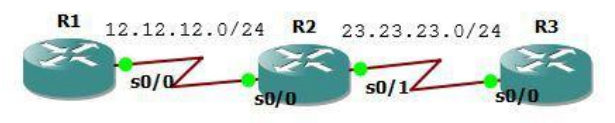
Type the following interface configuration. Make sure you can ping between directly connected interfaces.
R1
interface Loopback0
ip address 1.1.1.1 255.255.255.255
!
interface Serial0/0
ip address 12.12.12.1 255.255.255.0
!

R2
interface Loopback0
ip address 2.2.2.2 255.255.255.255
!
interface Serial0/0
ip address 12.12.12.2 255.255.255.0
!
interface Serial0/1
ip address 23.23.23.2 255.255.255.0
!

R3
interface Loopback0
ip address 3.3.3.3 255.255.255.255
!
interface Serial0/0
ip address 23.23.23.3 255.255.255.0
!
EIGRP configuration. Advertise the network into EIGRP routing. The Autonomous System Number (AS Number) must be the same on every router.
R1
 router eigrp 10
 network 1.1.1.1 0.0.0.0
 network 12.12.12.1 0.0.0.0
 no auto-summary

R2
 router eigrp 10
 network 2.2.2.2 0.0.0.0
 network 12.12.12.2 0.0.0.0
 network 23.23.23.2 0.0.0.0
 no auto-summary

R3
 router eigrp 10
 network 3.3.3.3 0.0.0.0
 network 23.23.23.3 0.0.0.0
 no auto-summary
Check the routing table and test ping.
R1#show ip route

Gateway of last resort is not set

    1.0.0.0/32 is subnetted, 1 subnets
C       1.1.1.1 is directly connected, Loopback0
    2.0.0.0/32 is subnetted, 1 subnets
D       2.2.2.2 [90/2297856] via 12.12.12.2, 00:06:56, Serial0/0
    3.0.0.0/32 is subnetted, 1 subnets
D       3.3.3.3 [90/2809856] via 12.12.12.2, 00:06:56, Serial0/0
    23.0.0.0/24 is subnetted, 1 subnets
D       23.23.23.0 [90/2681856] via 12.12.12.2, 00:06:56, Serial0/0
    12.0.0.0/24 is subnetted, 1 subnets
C       12.12.12.0 is directly connected, Serial0/0
R1#ping 2.2.2.2

Type escape sequence to abort.
Sending 5, 100-byte ICMP Echos to 2.2.2.2, timeout is 2 seconds:
!!!!!
Success rate is 100 percent (5/5), round-trip min/avg/max = 60/75/128 ms
R1#ping 3.3.3.3

Type escape sequence to abort.
Sending 5, 100-byte ICMP Echos to 3.3.3.3, timeout is 2 seconds:
!!!!!
Success rate is 100 percent (5/5), round-trip min/avg/max = 60/88/116 ms
EIGRP FIltering - Distribute List#
Used to filter networks based on network routes entering and leaving the interface. In the topology below, the goal is that the loopback ip 2.2.2.2 does not exist in R1’s routing table.
First method: filter the network using an access list on R1 with distribute IN.
Still using the previous lab.
access-list 10 deny 2.2.2.2
access-list 10 permit any
router eigrp 10
distribute-list 10 in Serial0/0
Check ip route.
R1#sh ip route

Gateway of last resort is not set

    1.0.0.0/32 is subnetted, 1 subnets
C       1.1.1.1 is directly connected, Loopback0
    3.0.0.0/32 is subnetted, 1 subnets
D       3.3.3.3 [90/2809856] via 12.12.12.2, 00:00:39, Serial0/0
    23.0.0.0/24 is subnetted, 1 subnets
D       23.23.23.0 [90/2681856] via 12.12.12.2, 00:00:39, Serial0/0
    12.0.0.0/24 is subnetted, 1 subnets
C       12.12.12.0 is directly connected, Serial0/0
R1#
Second method: filter the network using an access list on R2 with distribute OUT. Ensure the loopback ip 2.2.2.2 is back in R1’s routing table, then on R2 type the command below.
router eigrp 10
access-list 10 deny 2.2.2.2
access-list 10 permit any
distribute-list 10 out Serial0/0
Check the routing table to ensure the loopback ip 2.2.2.2 is not there.
EIGRP FIltering - Prefix List#
Filter the network based on prefix. When a prefix list IN is entered on R2, the R3 network denied by R2 will not be advertised to R1.
Still using the previous lab. The goal is to block networks on R3 with prefixes 24 to 28, while others are displayed.
R1
interface Loopback0
ip address 1.1.1.1 255.255.255.255
!
interface Serial0/0
ip address 12.12.12.1 255.255.255.0
!
router eigrp 10
network 0.0.0.0
no auto-summary
!

R2
interface Loopback0
ip address 2.2.2.2 255.255.255.255
!
interface Serial0/0
ip address 12.12.12.2 255.255.255.0
!
interface Serial0/1
ip address 23.23.23.2 255.255.255.0
!
router eigrp 10
network 0.0.0.0
no auto-summary
!

R3
interface Loopback0
ip address 3.3.3.3 255.255.255.255
!
interface Serial0/0
ip address 23.23.23.3 255.255.255.0
!
router eigrp 10
network 0.0.0.0
no auto-summary
!
On R1, create various loopback IPs to be filtered.
interface Loopback1
 ip address 3.3.3.17 255.255.255.240
!
interface Loopback2
 ip address 3.3.3.33 255.255.255.248
!
interface Loopback3
 ip address 3.3.3.150 255.255.255.252
!
interface Loopback4
 ip address 3.3.3.200 255.255.255.240
!
interface Loopback5
 ip address 3.3.3.100 255.255.255.224
!
Check R1’s routing table.
R1#sh ip route

Gateway of last resort is not set

    1.0.0.0/32 is subnetted, 1 subnets
C       1.1.1.1 is directly connected, Loopback0
    2.0.0.0/32 is subnetted, 1 subnets
D       2.2.2.2 [90/2297856] via 12.12.12.2, 00:04:45, Serial0/0
    3.0.0.0/8 is variably subnetted, 6 subnets, 5 masks
D       3.3.3.3/32 [90/2809856] via 12.12.12.2, 00:04:44, Serial0/0
D       3.3.3.16/28 [90/2809856] via 12.12.12.2, 00:00:02, Serial0/0
D       3.3.3.32/29 [90/2809856] via 12.12.12.2, 00:04:44, Serial0/0
D       3.3.3.96/27 [90/2809856] via 12.12.12.2, 00:00:05, Serial0/0
D       3.3.3.148/30 [90/2809856] via 12.12.12.2, 00:04:46, Serial0/0
D       3.3.3.192/28 [90/2809856] via 12.12.12.2, 00:00:05, Serial0/0
    23.0.0.0/24 is subnetted, 1 subnets
D       23.23.23.0 [90/2681856] via 12.12.12.2, 00:04:47, Serial0/0
    12.0.0.0/24 is subnetted, 1 subnets
C       12.12.12.0 is directly connected, Serial0/0
R1#
Configure prefix list filtering on R2 and check the routing table. Routes with prefixes between 24 to 28 are no longer there.
R2(config-router)#ip prefix-list EIGRP_IN seq 5 deny 3.3.3.0/24 le 28
R2(config)#ip prefix-list EIGRP_IN seq 10 permit 0.0.0.0/0 le 32
R2(config)#router eigrp 10
R2(config-router)#distribute-list prefix EIGRP_IN in
R2(config-router)#
*Mar 1 00:07:32.647: %DUAL-5-NBRCHANGE: IP-EIGRP(0) 10: Neighbor 12.12.12.1
(Serial0/0) is resync: route configuration changed
*Mar 1 00:07:32.647: %DUAL-5-NBRCHANGE: IP-EIGRP(0) 10: Neighbor 23.23.23.3
(Serial0/1) is resync: route configuration changed

R2#sh ip route

Gateway of last resort is not set

    1.0.0.0/32 is subnetted, 1 subnets
D       1.1.1.1 [90/2297856] via 12.12.12.1, 00:10:55, Serial0/0
    2.0.0.0/32 is subnetted, 1 subnets
C       2.2.2.2 is directly connected, Loopback0
    3.0.0.0/8 is variably subnetted, 3 subnets, 3 masks
D       3.3.3.3/32 [90/2297856] via 23.23.23.3, 00:02:51, Serial0/1
D       3.3.3.32/29 [90/2297856] via 23.23.23.3, 00:02:51, Serial0/1
D       3.3.3.148/30 [90/2297856] via 23.23.23.3, 00:02:51, Serial0/1
    23.0.0.0/24 is subnetted, 1 subnets
C       23.23.23.0 is directly connected, Serial0/1
    12.0.0.0/24 is subnetted, 1 subnets
C       12.12.12.0 is directly connected, Serial0/0
R2#
Likewise on R1.
R1#sh ip route

Gateway of last resort is not set

    1.0.0.0/32 is subnetted, 1 subnets
C       1.1.1.1 is directly connected, Loopback0
    2.0.0.0/32 is subnetted, 1 subnets
D       2.2.2.2 [90/2297856] via 12.12.12.2, 00:11:45, Serial0/0
    3.0.0.0/8 is variably subnetted, 3 subnets, 3 masks
D       3.3.3.3/32 [90/2809856] via 12.12.12.2, 00:03:22, Serial0/0
D       3.3.3.32/29 [90/2809856] via 12.12.12.2, 00:03:22, Serial0/0
D       3.3.3.148/30 [90/2809856] via 12.12.12.2, 00:03:22, Serial0/0
    23.0.0.0/24 is subnetted, 1 subnets
D       23.23.23.0 [90/2681856] via 12.12.12.2, 00:11:47, Serial0/0
    12.0.0.0/24 is subnetted, 1 subnets
C       12.12.12.0 is directly connected, Serial0/0
R1#
Still using the previous lab. The goal is to block networks on R3 with prefixes 24 to 28, while others are displayed.
If previously using prefix IN, now use OUT. The goal is to block networks on R3 with prefixes 28 to 30, while others are displayed. Remove the previous prefix list IN configuration.
R2(config)#router eigrp 10
R2(config-router)#no distribute-list prefix EIGRP_IN in
Make sure all networks appear in the routing table.
R1#sh ip route

Gateway of last resort is not set

    1.0.0.0/32 is subnetted, 1 subnets
C       1.1.1.1 is directly connected, Loopback0
    2.0.0.0/32 is subnetted, 1 subnets
D       2.2.2.2 [90/2297856] via 12.12.12.2, 00:04:45, Serial0/0
    3.0.0.0/8 is variably subnetted, 6 subnets, 5 masks
D       3.3.3.3/32 [90/2809856] via 12.12.12.2, 00:04:44, Serial0/0
D       3.3.3.16/28 [90/2809856] via 12.12.12.2, 00:00:02, Serial0/0
D       3.3.3.32/29 [90/2809856] via 12.12.12.2, 00:04:44, Serial0/0
D       3.3.3.96/27 [90/2809856] via 12.12.12.2, 00:00:05, Serial0/0
D       3.3.3.148/30 [90/2809856] via 12.12.12.2, 00:04:46, Serial0/0
D       3.3.3.192/28 [90/2809856] via 12.12.12.2, 00:00:05, Serial0/0
    23.0.0.0/24 is subnetted, 1 subnets
D       23.23.23.0 [90/2681856] via 12.12.12.2, 00:04:47, Serial0/0
    12.0.0.0/24 is subnetted, 1 subnets
C       12.12.12.0 is directly connected, Serial0/0
R1#
Configure prefix list filtering OUT on R2.
R2(config-router)# ip prefix-list EIGRP_OUT seq 5 deny 3.3.3.0/24 ge 28 le
30
R2(config)# ip prefix-list EIGRP_OUT seq 10 permit 0.0.0.0/0 ge 24
R2(config)#router eigrp 10
R2(config-router)#distribute-list prefix EIGRP_OUT out
Check the routing table on R1 and R2.
R2#sh ip route

Gateway of last resort is not set

    1.0.0.0/32 is subnetted, 1 subnets
D       1.1.1.1 [90/2297856] via 12.12.12.1, 00:10:55, Serial0/0
    2.0.0.0/32 is subnetted, 1 subnets
C       2.2.2.2 is directly connected, Loopback0
    3.0.0.0/8 is variably subnetted, 3 subnets, 3 masks
D       3.3.3.3/32 [90/2297856] via 23.23.23.3, 00:02:51, Serial0/1
D       3.3.3.32/29 [90/2297856] via 23.23.23.3, 00:02:51, Serial0/1
D       3.3.3.148/30 [90/2297856] via 23.23.23.3, 00:02:51, Serial0/1
    23.0.0.0/24 is subnetted, 1 subnets
C       23.23.23.0 is directly connected, Serial0/1
    12.0.0.0/24 is subnetted, 1 subnets
C       12.12.12.0 is directly connected, Serial0/0
R2#

R1#sh ip route

Gateway of last resort is not set

    1.0.0.0/32 is subnetted, 1 subnets
C       1.1.1.1 is directly connected, Loopback0
    2.0.0.0/32 is subnetted, 1 subnets
D       2.2.2.2 [90/2297856] via 12.12.12.2, 00:03:29, Serial0/0
    3.0.0.0/8 is variably subnetted, 2 subnets, 2 masks
D       3.3.3.3/32 [90/2809856] via 12.12.12.2, 00:03:28, Serial0/0
D       3.3.3.96/27 [90/2809856] via 12.12.12.2, 00:03:28, Serial0/0
    23.0.0.0/24 is subnetted, 1 subnets
D       23.23.23.0 [90/2681856] via 12.12.12.2, 00:03:29, Serial0/0
    12.0.0.0/24 is subnetted, 1 subnets
C       12.12.12.0 is directly connected, Serial0/0
R1#

R2#sh ip route

Gateway of last resort is not set

    1.0.0.0/32 is subnetted, 1 subnets
D       1.1.1.1 [90/2297856] via 12.12.12.1, 00:03:15, Serial0/0
    2.0.0.0/32 is subnetted, 1 subnets
C       2.2.2.2 is directly connected, Loopback0
    3.0.0.0/8 is variably subnetted, 2 subnets, 2 masks
D       3.3.3.3/32 [90/2297856] via 23.23.23.3, 00:03:15, Serial0/1
D       3.3.3.96/27 [90/2297856] via 23.23.23.3, 00:03:15, Serial0/1
    23.0.0.0/24 is subnetted, 1 subnets
C       23.23.23.0 is directly connected, Serial0/1
    12.0.0.0/24 is subnetted, 1 subnets
C       12.12.12.0 is directly connected, Serial0/0
R2#
EIGRP FIltering - Access List#
Access lists can also be used for filtering. The goal of this lab is to filter even and odd routes in the routing table.
Create odd and even loopback IPs and advertise them to EIGRP.
R1(config)#interface Loopback1
R1(config-if)# ip address 11.11.11.1 255.255.255.255
R1(config-if)#!
R1(config-if)#interface Loopback2
R1(config-if)# ip address 11.11.11.2 255.255.255.255
R1(config-if)#!
R1(config-if)#interface Loopback3
R1(config-if)# ip address 11.11.11.3 255.255.255.255
R1(config-if)#!
R1(config-if)#interface Loopback4
R1(config-if)# ip address 11.11.11.4 255.255.255.255
R1(config-if)#!
R1(config-if)#interface Loopback5
R1(config-if)# ip address 11.11.11.5 255.255.255.255
R1(config-if)#!
R1(config-if)#interface Loopback6
R1(config-if)# ip address 11.11.11.6 255.255.255.255
R1(config-if)#!
R1(config-if)#interface Loopback7
R1(config-if)# ip address 11.11.11.7 255.255.255.255
R1(config-if)#!
R1(config-if)#interface Loopback8
R1(config-if)# ip address 11.11.11.8 255.255.255.255
R1(config-if)#!

***Advertise ke EIGRP***
R1(config)#router eigrp 10
R1(config-router)# network 11.11.11.1 0.0.0.0
R1(config-router)# network 11.11.11.2 0.0.0.0
R1(config-router)# network 11.11.11.3 0.0.0.0
R1(config-router)# network 11.11.11.4 0.0.0.0
R1(config-router)# network 11.11.11.5 0.0.0.0
R1(config-router)# network 11.11.11.6 0.0.0.0
R1(config-router)# network 11.11.11.7 0.0.0.0
R1(config-router)# network 11.11.11.8 0.0.0.0

***Cek tabel routing***
R3(config)#do sh ip route

Gateway of last resort is not set

    1.0.0.0/32 is subnetted, 1 subnets
D       1.1.1.1 [90/2809856] via 23.23.23.2, 00:05:40, Serial0/0
    2.0.0.0/32 is subnetted, 1 subnets
D       2.2.2.2 [90/2297856] via 23.23.23.2, 00:00:03, Serial0/0
    3.0.0.0/32 is subnetted, 1 subnets
C       3.3.3.3 is directly connected, Loopback0
    23.0.0.0/24 is subnetted, 1 subnets
C       23.23.23.0 is directly connected, Serial0/0
    11.0.0.0/32 is subnetted, 8 subnets
D       11.11.11.8 [90/2809856] via 23.23.23.2, 00:00:03, Serial0/0
D       11.11.11.3 [90/2809856] via 23.23.23.2, 00:03:29, Serial0/0
D       11.11.11.2 [90/2809856] via 23.23.23.2, 00:00:04, Serial0/0
D       11.11.11.1 [90/2809856] via 23.23.23.2, 00:03:29, Serial0/0
D       11.11.11.7 [90/2809856] via 23.23.23.2, 00:03:29, Serial0/0
D       11.11.11.6 [90/2809856] via 23.23.23.2, 00:00:06, Serial0/0
D       11.11.11.5 [90/2809856] via 23.23.23.2, 00:03:30, Serial0/0
D       11.11.11.4 [90/2809856] via 23.23.23.2, 00:00:06, Serial0/0
    12.0.0.0/24 is subnetted, 1 subnets
D       12.12.12.0 [90/2681856] via 23.23.23.2, 00:00:06, Serial0/0
R3(config)#
Filter only the odd routes.
R3(config)#access-list 10 permit 0.0.0.1 255.255.255.254
R3(config)#router eigrp 10
R3(config-router)#distribute-list 10 in s0/0

Gateway of last resort is not set

    1.0.0.0/32 is subnetted, 1 subnets
D       1.1.1.1 [90/2809856] via 23.23.23.2, 00:07:25, Serial0/0
    3.0.0.0/32 is subnetted, 1 subnets
C       3.3.3.3 is directly connected, Loopback0
    23.0.0.0/24 is subnetted, 1 subnets
C       23.23.23.0 is directly connected, Serial0/0
    11.0.0.0/32 is subnetted, 4 subnets
D       11.11.11.3 [90/2809856] via 23.23.23.2, 00:05:12, Serial0/0
D       11.11.11.1 [90/2809856] via 23.23.23.2, 00:05:13, Serial0/0
D       11.11.11.7 [90/2809856] via 23.23.23.2, 00:05:14, Serial0/0
D       11.11.11.5 [90/2809856] via 23.23.23.2, 00:05:14, Serial0/0
R3(config)#
Filter only the even routes.
R3(config)#access-list 10 permit 0.0.0.0 255.255.255.254
R3(config)#router eigrp 10
R3(config-router)#distribute-list 10 in s0/0
R3(config)#
*Mar 1 00:14:41.751: %DUAL-5-NBRCHANGE: IP-EIGRP(0) 10: Neighbor 23.23.23.2
(Serial0/0) is resync: route configuration changed

R3(config)#do sh ip route

Gateway of last resort is not set

    2.0.0.0/32 is subnetted, 1 subnets
D       2.2.2.2 [90/2297856] via 23.23.23.2, 00:02:26, Serial0/0
    3.0.0.0/32 is subnetted, 1 subnets
C       3.3.3.3 is directly connected, Loopback0
    23.0.0.0/24 is subnetted, 1 subnets
C       23.23.23.0 is directly connected, Serial0/0
    11.0.0.0/32 is subnetted, 4 subnets
D       11.11.11.8 [90/2809856] via 23.23.23.2, 00:02:26, Serial0/0
D       11.11.11.2 [90/2809856] via 23.23.23.2, 00:02:26, Serial0/0
D       11.11.11.6 [90/2809856] via 23.23.23.2, 00:02:28, Serial0/0
D       11.11.11.4 [90/2809856] via 23.23.23.2, 00:02:28, Serial0/0
    12.0.0.0/24 is subnetted, 1 subnets
D       12.12.12.0 [90/2681856] via 23.23.23.2, 00:02:28, Serial0/0
R3(config)#
EIGRP FIltering - Administrative Distance#
To filter routes by setting the Administrative Distance (AD) to 255. Then the route will not enter the routing table.
Create a loopback interface and advertise it to the network.
R3(config)#int lo1
R3(config-if)#ip add 33.33.33.33 255.255.255.255

R3(config-if)#router eigrp 10
R3(config-router)#network 33.33.33.33 0.0.0.0
Ensure it has been advertised.
R2#sh ip route
Codes:  C - connected, S - static, R - RIP, M - mobile, B - BGP
        D - EIGRP, EX - EIGRP external, O - OSPF, IA - OSPF inter area
        N1 - OSPF NSSA external type 1, N2 - OSPF NSSA external type 2
        E1 - OSPF external type 1, E2 - OSPF external type 2
        i - IS-IS, su - IS-IS summary, L1 - IS-IS level-1, L2 - IS-IS level-2
        ia - IS-IS inter area, * - candidate default, U - per-user static
route
        o - ODR, P - periodic downloaded static route

Gateway of last resort is not set

    1.0.0.0/32 is subnetted, 1 subnets
D       1.1.1.1 [90/2297856] via 12.12.12.1, 00:04:36, Serial0/0
    2.0.0.0/32 is subnetted, 1 subnets
C       2.2.2.2 is directly connected, Loopback0
    33.0.0.0/32 is subnetted, 1 subnets
D       33.33.33.33 [90/2297856] via 23.23.23.3, 00:00:12, Serial0/1
    3.0.0.0/32 is subnetted, 1 subnets
D       3.3.3.3 [90/2297856] via 23.23.23.3, 00:00:12, Serial0/1
    23.0.0.0/24 is subnetted, 1 subnets
C       23.23.23.0 is directly connected, Serial0/1
    11.0.0.0/32 is subnetted, 8 subnets
D       11.11.11.8 [90/2297856] via 12.12.12.1, 00:02:56, Serial0/0
D       11.11.11.3 [90/2297856] via 12.12.12.1, 00:02:56, Serial0/0
D       11.11.11.2 [90/2297856] via 12.12.12.1, 00:02:58, Serial0/0
D       11.11.11.1 [90/2297856] via 12.12.12.1, 00:02:58, Serial0/0
D       11.11.11.7 [90/2297856] via 12.12.12.1, 00:02:57, Serial0/0
D       11.11.11.6 [90/2297856] via 12.12.12.1, 00:02:58, Serial0/0
D       11.11.11.5 [90/2297856] via 12.12.12.1, 00:02:58, Serial0/0
D       11.11.11.4 [90/2297856] via 12.12.12.1, 00:02:58, Serial0/0
    12.0.0.0/24 is subnetted, 1 subnets
C       12.12.12.0 is directly connected, Serial0/0
R2#ping 3.3.3.3

Type escape sequence to abort.
Sending 5, 100-byte ICMP Echos to 3.3.3.3, timeout is 2 seconds:
!!!!!
Success rate is 100 percent (5/5), round-trip min/avg/max = 64/82/96 ms
R2#
By setting distance 255 on network 33.33.33.33 in R2, network 33.33.33.33 will not appear in R2’s routing table. When checked, network 33.33.33.33 is no longer there.
R2(config)#access-list 33 permit 33.33.33.33
R2(config)#router eigrp 10
R2(config-router)#distance 255 0.0.0.0 255.255.255.255 33

R2(config-router)#do sh ip route

Gateway of last resort is not set

    1.0.0.0/32 is subnetted, 1 subnets
D       1.1.1.1 [90/2297856] via 12.12.12.1, 00:00:13, Serial0/0
    2.0.0.0/32 is subnetted, 1 subnets
C       2.2.2.2 is directly connected, Loopback0
    3.0.0.0/32 is subnetted, 1 subnets
D       3.3.3.3 [90/2297856] via 23.23.23.3, 00:00:13, Serial0/1
    23.0.0.0/24 is subnetted, 1 subnets
C       23.23.23.0 is directly connected, Serial0/1
    11.0.0.0/32 is subnetted, 8 subnets
D       11.11.11.8 [90/2297856] via 12.12.12.1, 00:00:13, Serial0/0
D       11.11.11.3 [90/2297856] via 12.12.12.1, 00:00:15, Serial0/0
D       11.11.11.2 [90/2297856] via 12.12.12.1, 00:00:15, Serial0/0
D       11.11.11.1 [90/2297856] via 12.12.12.1, 00:00:15, Serial0/0
D       11.11.11.7 [90/2297856] via 12.12.12.1, 00:00:18, Serial0/0
D       11.11.11.6 [90/2297856] via 12.12.12.1, 00:00:18, Serial0/0
D       11.11.11.5 [90/2297856] via 12.12.12.1, 00:00:18, Serial0/0
D       11.11.11.4 [90/2297856] via 12.12.12.1, 00:00:18, Serial0/0
    12.0.0.0/24 is subnetted, 1 subnets
C       12.12.12.0 is directly connected, Serial0/0
R2(config-router)#do ping 33.33.33.33

Type escape sequence to abort.
Sending 5, 100-byte ICMP Echos to 33.33.33.33, timeout is 2 seconds:
.....
Success rate is 0 percent (0/5)
R2(config-router)#
EIGRP Authentication#
To provide authentication in EIGRP by setting a password, Authentication will prevent the router from receiving update packets from just any EIGRP router.
Set authentication on R1 and R2.
R1(config)#key chain EIGRP
R1(config-keychain)#key 1
R1(config-keychain-key)#key-string CISCO
R1(config-keychain-key)#int s0/0
R1(config-if)#ip authentication mode eigrp 10 md5
R1(config-if)#ip authentication key-chain eigrp 10 EIGRP
*Mar 1 00:00:31.507: %DUAL-5-NBRCHANGE: IP-EIGRP(0) 10: Neighbor 12.12.12.2
(Serial0/0) is down: authentication mode changed
R2(config)#key chain EIGRP
R2(config-keychain)#key 1
R2(config-keychain-key)#key-string CISCO
R2(config-keychain-key)#int s0/0
R2(config-if)#ip authentication mode eigrp 10 md5
R2(config-if)#ip authentication key-chain eigrp 10 EIGRP
R2(config-if)#
*Mar 1 00:00:31.911: %DUAL-5-NBRCHANGE: IP-EIGRP(0) 10: Neighbor 12.12.12.1
(Serial0/0) is down: authentication mode changedPerform debug for checking.
R1#debug eigrp packets
EIGRP Packets debugging is on
    (UPDATE, REQUEST, QUERY, REPLY, HELLO, IPXSAP, PROBE, ACK, STUB,
SIAQUERY, SIAREPLY)
R1#
*Mar 1 00:01:15.211: EIGRP: received packet with MD5 authentication, key id
= 1
*Mar 1 00:01:15.215: EIGRP: Received HELLO on Serial0/0 nbr 12.12.12.2
*Mar 1 00:01:15.215: AS 10, Flags 0x0, Seq 0/0 idbQ 0/0 iidbQ un/rely 0/0
peerQ un/rely 0/0
R1#
*Mar 1 00:01:18.395: EIGRP: Sending HELLO on Serial0/0
*Mar 1 00:01:18.395: AS 10, Flags 0x0, Seq 0/0 idbQ 0/0 iidbQ un/rely 0/0
*Mar 1 00:01:18.419: EIGRP: Sending HELLO on Loopback0
*Mar 1 00:01:18.419: AS 10, Flags 0x0, Seq 0/0 idbQ 0/0 iidbQ un/rely 0/0
*Mar 1 00:01:18.423: EIGRP: Received HELLO on Loopback0 nbr 1.1.1.1
*Mar 1 00:01:18.423: AS 10, Flags 0x0, Seq 0/0 idbQ 0/0
*Mar 1 00:01:18.427: EIGRP: Packet from ourselves ignored
R1#
*Mar 1 00:01:27.315: EIGRP: Sending HELLO on Serial0/0
*Mar 1 00:01:27.315: AS 10, Flags 0x0, Seq 0/0 idbQ 0/0 iidbQ un/rely 0/0
*Mar 1 00:01:27.655: EIGRP: Sending HELLO on Loopback0
*Mar 1 00:01:27.655: AS 10, Flags 0x0, Seq 0/0 idbQ 0/0 iidbQ un/rely 0/0
*Mar 1 00:01:27.659: EIGRP: Received HELLO on Loopback0 nbr 1.1.1.1
*Mar 1 00:01:27.663: AS 10, Flags 0x0, Seq 0/0 idbQ 0/0
Turn off EIGRP debug.
R1#undebug eigrp packets
EIGRP Packets debugging is off
Check EIGRP adjacency.
R1#sh ip eigrp neighbors
IP-EIGRP neighbors for process 10
H   Address         Interface       Hold Uptime     SRTT    RTO  Q   Seq
                                    (sec)           (ms)         Cnt Num
0   12.12.12.2      Se0/0           11 00:02:43     27      200  0   8
R1#
EIGRP Summarization#
Summarization is used to summarize multiple routes into one route. Its function is to reduce the size of the routing table and reduce routing updates.
Create a loopback interface on R2 to be advertised to EIGRP.
R2(config)#interface Loopback1
R2(config-if)# ip address 22.22.22.1 255.255.255.255
R2(config-if)#!
R2(config-if)#interface Loopback2
R2(config-if)# ip address 22.22.22.2 255.255.255.255
R2(config-if)#!
R2(config-if)#interface Loopback3
R2(config-if)# ip address 22.22.22.3 255.255.255.255
R2(config-if)#!
R2(config-if)#interface Loopback4
R2(config-if)# ip address 22.22.22.4 255.255.255.255
R2(config-if)#!
R2(config-if)#interface Loopback5
R2(config-if)# ip address 22.22.22.5 255.255.255.255
R2(config-if)#!
R2(config-if)#interface Loopback6
R2(config-if)# ip address 22.22.22.6 255.255.255.255
R2(config-if)#!
R2(config-if)#interface Loopback7
R2(config-if)# ip address 22.22.22.7 255.255.255.255
R2(config-if)#!
R2(config-if)#interface Loopback8
R2(config-if)# ip address 22.22.22.8 255.255.255.255
R2(config-if)#!

R2(config-if)#router eigrp 10
R2(config-router)# network 22.22.22.1 0.0.0.0
R2(config-router)# network 22.22.22.2 0.0.0.0
R2(config-router)# network 22.22.22.3 0.0.0.0
R2(config-router)# network 22.22.22.4 0.0.0.0
R2(config-router)# network 22.22.22.5 0.0.0.0
R2(config-router)# network 22.22.22.6 0.0.0.0
R2(config-router)# network 22.22.22.7 0.0.0.0
R2(config-router)# network 22.22.22.8 0.0.0.0
Check on R1 and R3.
R3#show ip route

Gateway of last resort is not set

    1.0.0.0/32 is subnetted, 1 subnets
D       1.1.1.1 [90/2809856] via 23.23.23.2, 00:07:53, Serial0/0
    2.0.0.0/32 is subnetted, 1 subnets
D       2.2.2.2 [90/2297856] via 23.23.23.2, 00:07:53, Serial0/0
    3.0.0.0/32 is subnetted, 1 subnets
C       3.3.3.3 is directly connected, Loopback0
    23.0.0.0/24 is subnetted, 1 subnets
C       23.23.23.0 is directly connected, Serial0/0
    22.0.0.0/32 is subnetted, 8 subnets
D       22.22.22.6 [90/2297856] via 23.23.23.2, 00:00:28, Serial0/0
D       22.22.22.7 [90/2297856] via 23.23.23.2, 00:00:31, Serial0/0
D       22.22.22.4 [90/2297856] via 23.23.23.2, 00:00:31, Serial0/0
D       22.22.22.5 [90/2297856] via 23.23.23.2, 00:00:31, Serial0/0
D       22.22.22.2 [90/2297856] via 23.23.23.2, 00:00:32, Serial0/0
D       22.22.22.3 [90/2297856] via 23.23.23.2, 00:00:32, Serial0/0
D       22.22.22.1 [90/2297856] via 23.23.23.2, 00:00:32, Serial0/0
D       22.22.22.8 [90/2297856] via 23.23.23.2, 00:00:31, Serial0/0
    12.0.0.0/24 is subnetted, 1 subnets
D       12.12.12.0 [90/2681856] via 23.23.23.2, 00:07:57, Serial0/0
R3#
Configure summarization on interface s0/1 on R2.
R2(config-router)# int s0/1
R2(config-if)#ip summary-address eigrp 10 22.22.22.0 255.255.255.248
R2(config-if)#
*Mar 1 00:13:09.727: %DUAL-5-NBRCHANGE: IP-EIGRP(0) 10: Neighbor 23.23.23.3
(Serial0/1) is resync: summary configured
Check on R3.
R3#sh ip route


Gateway of last resort is not set

    1.0.0.0/32 is subnetted, 1 subnets
D       1.1.1.1 [90/2809856] via 23.23.23.2, 00:13:36, Serial0/0
    2.0.0.0/32 is subnetted, 1 subnets
D       2.2.2.2 [90/2297856] via 23.23.23.2, 00:13:36, Serial0/0
    3.0.0.0/32 is subnetted, 1 subnets
C       3.3.3.3 is directly connected, Loopback0
    23.0.0.0/24 is subnetted, 1 subnets
C       23.23.23.0 is directly connected, Serial0/0
    22.0.0.0/8 is variably subnetted, 2 subnets, 2 masks
D       22.22.22.0/29 [90/2297856] via 23.23.23.2, 00:00:38, Serial0/0
D       22.22.22.8/32 [90/2297856] via 23.23.23.2, 00:06:13, Serial0/0
    12.0.0.0/24 is subnetted, 1 subnets
D       12.12.12.0 [90/2681856] via 23.23.23.2, 00:13:39, Serial0/0
R3#ping 22.22.22.1

Type escape sequence to abort.
Sending 5, 100-byte ICMP Echos to 22.22.22.1, timeout is 2 seconds:
!!!!!
Success rate is 100 percent (5/5), round-trip min/avg/max = 60/96/152 ms
R3#ping 22.22.22.8

Type escape sequence to abort.
Sending 5, 100-byte ICMP Echos to 22.22.22.8, timeout is 2 seconds:
!!!!!
Success rate is 100 percent (5/5), round-trip min/avg/max = 32/52/92 ms
R3#
EIGRP Unicast Update#
By default EIGRP performs updates via multicast ip 224.0.0.10, unicast update changes the update from multicast to unicast for its neighbor.
Check that EIGRP sends updates via multicast. The multicast IP is 224.0.0.10
R1#debug ip packet detail
IP packet debugging is on (detailed)
R1#
*Mar 1 00:00:57.331: IP: s=12.12.12.2 (Serial0/0), d=224.0.0.10, len 60,
rcvd 2, proto=88
*Mar 1 00:00:58.079: IP: s=1.1.1.1 (local), d=224.0.0.10 (Loopback0), len
60, sending broad/multicast, proto=88
*Mar 1 00:00:58.083: IP: s=1.1.1.1 (Loopback0), d=224.0.0.10, len 60, rcvd
2, proto=88
R1#
*Mar 1 00:01:00.271: IP: s=12.12.12.1 (local), d=224.0.0.10 (Serial0/0),
len 60, sending broad/multicast, proto=88
R1#
*Mar 1 00:01:03.019: IP: s=1.1.1.1 (local), d=224.0.0.10 (Loopback0), len
60, sending broad/multicast, proto=88
*Mar 1 00:01:03.023: IP: s=1.1.1.1 (Loopback0), d=224.0.0.10, len 60, rcvd
2, proto=88
R1#undebug ip packet detail
IP packet debugging is off (detailed)
Configure the link from R1 to R2 to be unicast.
R1(config)#router eigrp 10
R1(config-router)#neighbor 12.12.12.2 s0/0
R1(config-router)#
*Mar 1 00:09:36.483: %DUAL-5-NBRCHANGE: IP-EIGRP(0) 10: Neighbor 12.12.12.2
(Serial0/0) is down: Static peer configured
R1(config-router)#
R2(config)#router eigrp 10
R2(config-router)#neighbor 12.12.12.1 s0/0
Check debug again, it should have changed to unicast.
R1#debug ip packet detail
IP packet debugging is on (detailed)
R1#
*Mar 1 00:15:51.467: IP: tableid=0, s=12.12.12.2 (Serial0/0), d=12.12.12.1
(Serial0/0), routed via RIB
*Mar 1 00:15:51.471: IP: s=12.12.12.2 (Serial0/0), d=12.12.12.1
(Serial0/0), len 60, rcvd 3, proto=88
R1#
R1#undebug ip packet detail
IP packet debugging is off (detailed)
R1#
EIGRP Default Route – Summary Address#
So that every router does not need to manually create default route configurations one by one.
R1(config)#int s0/0
R1(config-if)#ip sum
R1(config-if)#ip summary-address eig
R1(config-if)#ip summary-address eigrp 10 0.0.0.0 0.0.0.0
R1(config-if)#
*Mar 1 00:01:20.419: %DUAL-5-NBRCHANGE: IP-EIGRP(0) 10: Neighbor 12.12.12.2
(Serial0/0) is resync: summary configured
Check on R1.
R1(config-if)#do sh ip route

Gateway of last resort is 0.0.0.0 to network 0.0.0.0

    1.0.0.0/32 is subnetted, 1 subnets
C       1.1.1.1 is directly connected, Loopback0
    2.0.0.0/32 is subnetted, 1 subnets
D       2.2.2.2 [90/2297856] via 12.12.12.2, 00:01:15, Serial0/0
    3.0.0.0/32 is subnetted, 1 subnets
D       3.3.3.3 [90/2809856] via 12.12.12.2, 00:01:14, Serial0/0
    23.0.0.0/24 is subnetted, 1 subnets
D       23.23.23.0 [90/2681856] via 12.12.12.2, 00:01:15, Serial0/0
    22.0.0.0/32 is subnetted, 8 subnets
D       22.22.22.6 [90/2297856] via 12.12.12.2, 00:01:17, Serial0/0
D       22.22.22.7 [90/2297856] via 12.12.12.2, 00:01:17, Serial0/0
D       22.22.22.4 [90/2297856] via 12.12.12.2, 00:01:17, Serial0/0
D       22.22.22.5 [90/2297856] via 12.12.12.2, 00:01:17, Serial0/0
D       22.22.22.2 [90/2297856] via 12.12.12.2, 00:01:18, Serial0/0
D       22.22.22.3 [90/2297856] via 12.12.12.2, 00:01:18, Serial0/0
D       22.22.22.1 [90/2297856] via 12.12.12.2, 00:01:18, Serial0/0
D       22.22.22.8 [90/2297856] via 12.12.12.2, 00:01:18, Serial0/0
    12.0.0.0/24 is subnetted, 1 subnets
C       12.12.12.0 is directly connected, Serial0/0
D*  0.0.0.0/0 is a summary, 00:00:17, Null0
In the default route there will be a Null0. Null0 functions to drop packets whose destination is not found due to the default route.
EIGRP Redistribution - RIP#
To redistribute RIP into EIGRP.
Create a loopback interface on R1 and advertise it into RIP.
R1(config-if)#int lo1
R1(config-if)#ip add 111.111.111.111 255.255.255.255

R1(config-if)#router rip
R1(config-router)#version 2
R1(config-router)#network 111.111.111.0
R1(config-router)#no auto-summary
Redistribute RIP to EIGRP.
R2(config)#ipv6 unicast-routing
R2(config)#int fa0/0
R2(config-if)#ipv6 rip 17 enable
R2(config-if)#int fa0/1
R2(config-if)#ipv6 rip 17 enable
Redistribute RIP to EIGRP.
R1(config)#router eigrp 10
R1(config-router)#redistribute rip metric 1 1 1 1 1
Check the routing table and test ping.
R1#sh ip route

Gateway of last resort is not set

    1.0.0.0/32 is subnetted, 1 subnets
C       1.1.1.1 is directly connected, Loopback0
    2.0.0.0/32 is subnetted, 1 subnets
D       2.2.2.2 [90/2297856] via 12.12.12.2, 00:25:20, Serial0/0
    3.0.0.0/32 is subnetted, 1 subnets
D       3.3.3.3 [90/2809856] via 12.12.12.2, 00:25:20, Serial0/0
    23.0.0.0/24 is subnetted, 1 subnets
D       23.23.23.0 [90/2681856] via 12.12.12.2, 00:25:20, Serial0/0
    111.0.0.0/32 is subnetted, 1 subnets
C       111.111.111.111 is directly connected, Loopback1
    12.0.0.0/24 is subnetted, 1 subnets
C       12.12.12.0 is directly connected, Serial0/0
R1#

R3#sh ip route

Gateway of last resort is not set

    1.0.0.0/32 is subnetted, 1 subnets
D       1.1.1.1 [90/2809856] via 23.23.23.2, 00:13:37, Serial0/0
    2.0.0.0/32 is subnetted, 1 subnets
D       2.2.2.2 [90/2297856] via 23.23.23.2, 00:13:38, Serial0/0
    3.0.0.0/32 is subnetted, 1 subnets
C       3.3.3.3 is directly connected, Loopback0
    23.0.0.0/24 is subnetted, 1 subnets
C       23.23.23.0 is directly connected, Serial0/0
    111.0.0.0/32 is subnetted, 1 subnets
D       EX 111.111.111.111 [170/2561024256] via 23.23.23.2, 00:00:06, Serial0/0
    12.0.0.0/24 is subnetted, 1 subnets
D       12.12.12.0 [90/2681856] via 23.23.23.2, 00:13:40, Serial0/0
R3#ping 111.111.111.111

Type escape sequence to abort.
Sending 5, 100-byte ICMP Echos to 111.111.111.111, timeout is 2 seconds:
!!!!!
Success rate is 100 percent (5/5), round-trip min/avg/max = 52/98/248 ms
R3#
The EX sign indicates that the route is generated by a redistribute process.
EIGRP Redistribution - OSPF#
To redistribute OSPF into EIGRP.
Create a loopback interface on R2 and advertise it into OSPF.
R2(config)#int lo1
R2(config-if)#ip add 22
R2(config-if)#ip add 222.222.222.222 255.255.255.255

R2(config-if)#router ospf 11
R2(config-router)#net 222.222.222.222 0.0.0.0 area 0
Redistribute OSPF to EIGRP.
R2(config)#router eigrp 10
R2(config-router)#redistribute ospf 11 metric 1 1 1 1 1
Check the routing table and test ping.
R1#sh ip route

Gateway of last resort is not set

    222.222.222.0/32 is subnetted, 1 subnets
D       EX 222.222.222.222 [170/2560512256] via 12.12.12.2, 00:00:52, Serial0/0
    1.0.0.0/32 is subnetted, 1 subnets
C       1.1.1.1 is directly connected, Loopback0
    2.0.0.0/32 is subnetted, 1 subnets
D       2.2.2.2 [90/2297856] via 12.12.12.2, 00:05:14, Serial0/0
    3.0.0.0/32 is subnetted, 1 subnets
D       3.3.3.3 [90/2809856] via 12.12.12.2, 00:05:14, Serial0/0
    23.0.0.0/24 is subnetted, 1 subnets
D       23.23.23.0 [90/2681856] via 12.12.12.2, 00:05:17, Serial0/0
    111.0.0.0/32 is subnetted, 1 subnets
C       111.111.111.111 is directly connected, Loopback1
    12.0.0.0/24 is subnetted, 1 subnets
C       12.12.12.0 is directly connected, Serial0/0
R1#ping 222.222.222.222

Type escape sequence to abort.
Sending 5, 100-byte ICMP Echos to 222.222.222.222, timeout is 2 seconds:
!!!!!
Success rate is 100 percent (5/5), round-trip min/avg/max = 40/64/92 ms
R1#
EIGRP Path Selection - Delay#
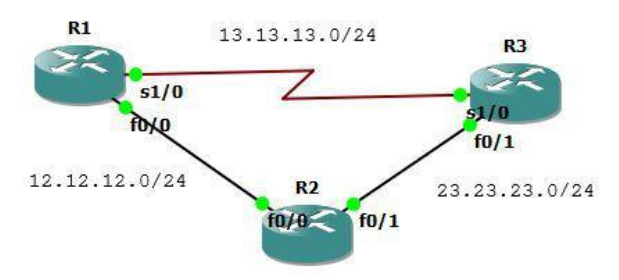
Create the topology as above and configure the interfaces and EIGRP.
R1(config)#int lo0
R1(config-if)#ip add 1.1.1.1 255.255.255.255
R1(config-if)#int s1/0
R1(config-if)#ip add 13.13.13.1 255.255.255.0
R1(config-if)#no sh
R1(config-if)#int f0/0
R1(config-if)#ip add 12.12.12.1 255.255.255.0
R1(config-if)#no sh
R1(config-if)#router eigrp 13
R1(config-router)#net 1.1.1.1 0.0.0.0
R1(config-router)#net 13.13.13.1 0.0.0.0
R1(config-router)#net 12.12.12.1 0.0.0.0
R1(config-router)#no au

R2(config)#int lo0
R2(config-if)#ip add 2.2.2.2 255.255.255.255
R2(config-if)#int f0/0
R2(config-if)#ip add 12.12.12.2 255.255.255.0
R2(config-if)#no sh
R2(config-if)#int fa0/1
R2(config-if)#ip add 23.23.23.2 255.255.255.0
R2(config-if)#no sh
R2(config-if)#router eigrp 13
R2(config-router)#net 2.2.2.2 0.0.0.0
R2(config-router)#net 12.12.12.2 0.0.0.0
R2(config-router)#net 23.23.23.2 0.0.0.0
R2(config-router)#no au

R3(config)#int lo0
R3(config-if)#ip add 3.3.3.3 255.255.255.255
R3(config-if)#int s1/0
R3(config-if)#ip add 13.13.13.3 255.255.255.0
R3(config-if)#no sh
R3(config-if)#int f0/1
R3(config-if)#ip add 23.23.23.3 255.255.255.0
R3(config-if)#router eigrp 13
R3(config-router)#net 3.3.3.3 0.0.0.0
R3(config-router)#net 13.13.13.3 0.0.0.0
R3(config-router)#net 23.23.23.3 0.0.0.0
R3(config-router)#no au

R2(config)#ipv6 router eigrp 13
R2(config-rtr)#router-id 2.2.2.2
R2(config-rtr)#no shut
*Mar 1 00:33:55.991: %DUAL-5-NBRCHANGE: IPv6-EIGRP(0) 13: Neighbor
FE80::C203:3FF:FEA8:1 (FastEthernet0/1) is up: new adjacency
*Mar 1 00:34:25.179: %DUAL-5-NBRCHANGE: IPv6-EIGRP(0) 13: Neighbor
FE80::C201:9FF:FED0:0 (FastEthernet0/0) is up: new adjacency
R2(config-rtr)#int lo0
R2(config-if)#ipv6 eigrp 13
R2(config-rtr)#int fa0/0
R2(config-if)#ipv6 eigrp 13
R2(config-rtr)#int fa0/1
R2(config-if)#ipv6 eigrp 13
Find out the route used to 3.3.3.3.
R1# sh ip route 3.3.3.3
Routing entry for 3.3.3.3/32
    Known via "eigrp 13", distance 90, metric 435200, type internal
    Redistributing via eigrp 13
    Last update from 12.12.12.2 on FastEthernet0/0, 00:04:36 ago
    Routing Descriptor Blocks:
    * 12.12.12.2, from 12.12.12.2, 00:04:36 ago, via FastEthernet0/0
        Route metric is 435200, traffic share count is 1
        Total delay is 7000 microseconds, minimum bandwidth is 10000 Kbit
        Reliability 255/255, minimum MTU 1500 bytes
        Loading 1/255, Hops 2
Find out all routes used to 3.3.3.3 with EIGRP.
R1#sh ip eigrp top 3.3.3.3 255.255.255.255
IP-EIGRP (AS 13): Topology entry for 3.3.3.3/32
    State is Passive, Query origin flag is 1, 1 Successor(s), FD is 435200
    Routing Descriptor Blocks:
    12.12.12.2 (FastEthernet0/0), from 12.12.12.2, Send flag is 0x0
        Composite metric is (435200/409600), Route is Internal
        Vector metric:
            Minimum bandwidth is 10000 Kbit
            Total delay is 7000 microseconds
            Reliability is 255/255
            Load is 1/255
            Minimum MTU is 1500
            Hop count is 2
    13.13.13.3 (Serial1/0), from 13.13.13.3, Send flag is 0x0
        Composite metric is (2297856/128256), Route is Internal
        Vector metric:
            Minimum bandwidth is 1544 Kbit
            Total delay is 25000 microseconds
            Reliability is 255/255
            Load is 1/255
            Minimum MTU is 1500
            Hop count is 1
It turns out that EIGRP prefers FastEthernet over Serial. This is because the FastEthernet bandwidth is larger. To make Serial the primary link, it can be done by changing the delay.
R1(config)#int fa0/0
R1(config-if)#delay 100000
R1(config-if)#do clear ip eigrp neighbor

*Mar 1 00:22:45.311: %DUAL-5-NBRCHANGE: IP-EIGRP(0) 13: Neighbor 13.13.13.3
(Serial1/0) is down: manually cleared
*Mar 1 00:22:45.327: %DUAL-5-NBRCHANGE: IP-EIGRP(0) 13: Neighbor 12.12.12.2
(FastEthernet0/0) is down: manually cleared
*Mar 1 00:22:45.863: %DUAL-5-NBRCHANGE: IP-EIGRP(0) 13: Neighbor 12.12.12.2
(FastEthernet0/0) is up: new adjacency
*Mar 1 00:22:46.551: %DUAL-5-NBRCHANGE: IP-EIGRP(0) 13: Neighbor 13.13.13.3
(Serial1/0) is up: new adjacency
*Mar 1 00:23:01.507: %SYS-5-CONFIG_I: Configured from console by console
Now check again and the path has moved through Serial1/0.
R1#sh ip eigrp top 3.3.3.3 255.255.255.255
IP-EIGRP (AS 13): Topology entry for 3.3.3.3/32
    State is Passive, Query origin flag is 1, 1 Successor(s), FD is 2297856
    Routing Descriptor Blocks:
    13.13.13.3 (Serial1/0), from 13.13.13.3, Send flag is 0x0
        Composite metric is (2297856/128256), Route is Internal
        Vector metric:
            Minimum bandwidth is 1544 Kbit
            Total delay is 25000 microseconds
            Reliability is 255/255
            Load is 1/255
            Minimum MTU is 1500
            Hop count is 1
    12.12.12.2 (FastEthernet0/0), from 12.12.12.2, Send flag is 0x0
        Composite metric is (26009600/409600), Route is Internal
        Vector metric:
            Minimum bandwidth is 10000 Kbit
            Total delay is 1006000 microseconds
            Reliability is 255/255
            Load is 1/255
            Minimum MTU is 1500
            Hop count is 2
R1#sh ip route 3.3.3.3
Routing entry for 3.3.3.3/32
    Known via "eigrp 13", distance 90, metric 2297856, type internal
    Redistributing via eigrp 13
    Last update from 13.13.13.3 on Serial1/0, 00:00:43 ago
    Routing Descriptor Blocks:
    * 13.13.13.3, from 13.13.13.3, 00:00:43 ago, via Serial1/0
        Route metric is 2297856, traffic share count is 1
        Total delay is 25000 microseconds, minimum bandwidth is 1544 Kbit
        Reliability 255/255, minimum MTU 1500 bytes
        Loading 1/255, Hops 1

R1#traceroute 3.3.3.3

Type escape sequence to abort.
Tracing the route to 3.3.3.3

 1 13.13.13.3 140 msec 4 msec 68 msec
R1#traceroute 2.2.2.2

Type escape sequence to abort.
Tracing the route to 2.2.2.2

 1 13.13.13.3 172 msec 72 msec 72 msec
 2 23.23.23.2 140 msec 144 msec 72 msec
R1#
EIGRP Path Selection - Bandwidth#
Besides using delay, you can also use bandwidth. First, remove the previous delay configuration so the route changes back to normal.
R1(config)#int f0/0
R1(config-if)#no delay 100000
R1(config-if)#do sh ip eigrp top 3.3.3.3 255.255.255.255
IP-EIGRP (AS 13): Topology entry for 3.3.3.3/32
    State is Passive, Query origin flag is 1, 1 Successor(s), FD is 435200
    Routing Descriptor Blocks:
    12.12.12.2 (FastEthernet0/0), from 12.12.12.2, Send flag is 0x0
        Composite metric is (435200/409600), Route is Internal
        Vector metric:
            Minimum bandwidth is 10000 Kbit
            Total delay is 7000 microseconds
            Reliability is 255/255
            Load is 1/255
            Minimum MTU is 1500
            Hop count is 2
    13.13.13.3 (Serial1/0), from 13.13.13.3, Send flag is 0x0
        Composite metric is (2297856/128256), Route is Internal
        Vector metric:
            Minimum bandwidth is 1544 Kbit
            Total delay is 25000 microseconds
            Reliability is 255/255
            Load is 1/255
            Minimum MTU is 1500
            Hop count is 1
Change bandwidth.
R1(config-if)#bandwidth 1000
R1(config-if)#do clear ip eigrp neighbor
Now check again.
R1(config-if)#do sh ip eigrp top 3.3.3.3 255.255.255.255
IP-EIGRP (AS 13): Topology entry for 3.3.3.3/32
    State is Passive, Query origin flag is 1, 1 Successor(s), FD is 2297856
    Routing Descriptor Blocks:
    13.13.13.3 (Serial1/0), from 13.13.13.3, Send flag is 0x0
        Composite metric is (2297856/128256), Route is Internal
        Vector metric:
            Minimum bandwidth is 1544 Kbit
            Total delay is 25000 microseconds
            Reliability is 255/255
            Load is 1/255
            Minimum MTU is 1500
            Hop count is 1
    12.12.12.2 (FastEthernet0/0), from 12.12.12.2, Send flag is 0x0
        Composite metric is (2739200/409600), Route is Internal
        Vector metric:
            Minimum bandwidth is 1000 Kbit
            Total delay is 7000 microseconds
            Reliability is 255/255
            Load is 1/255
            Minimum MTU is 1500
            Hop count is 2
R1(config-if)#

R1#sh ip route

Gateway of last resort is not set

    1.0.0.0/32 is subnetted, 1 subnets
C       1.1.1.1 is directly connected, Loopback0
    2.0.0.0/32 is subnetted, 1 subnets
D       2.2.2.2 [90/2323456] via 13.13.13.3, 00:00:27, Serial1/0
    3.0.0.0/32 is subnetted, 1 subnets
D       3.3.3.3 [90/2297856] via 13.13.13.3, 00:00:27, Serial1/0
    23.0.0.0/24 is subnetted, 1 subnets
D       23.23.23.0 [90/2195456] via 13.13.13.3, 00:00:27, Serial1/0
    12.0.0.0/24 is subnetted, 1 subnets
C       12.12.12.0 is directly connected, FastEthernet0/0
    13.0.0.0/24 is subnetted, 1 subnets
C       13.13.13.0 is directly connected, Serial1/0
R1#traceroute 3.3.3.3

Type escape sequence to abort.
Tracing the route to 3.3.3.3

 1 13.13.13.3 152 msec 140 msec 72 msec
R1#traceroute 2.2.2.2

Type escape sequence to abort.
Tracing the route to 2.2.2.2

 1 13.13.13.3 184 msec 44 msec 16 msec
 2 23.23.23.2 140 msec 96 msec 36 msec
EIGRP Equal Load Balancing#
By default, EIGRP will apply load balancing on equal links. In the topology below from R1 to R3, you can use 2 paths and both are FastEthernet.
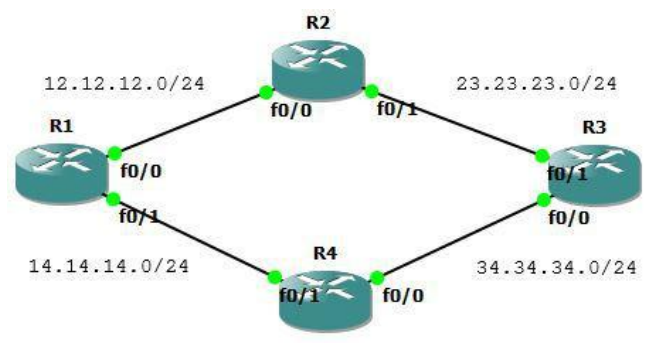
Create the topology above and perform the following configuration.
R1(config)#int lo0
R1(config-if)#ip add 1.1.1.1 255.255.255.255
R1(config-if)#int f0/0
R1(config-if)#ip add 12.12.12.1 255.255.255.0
R1(config-if)#no sh
R1(config-if)#int fa0/1
R1(config-if)#ip add 14.14.14.1 255.255.255.0
R1(config-if)#no sh
R1(config-if)#router eigrp 16
R1(config-router)#net 0.0.0.0
R1(config-router)#no au

R2(config)#int lo0
R2(config-if)#ip add 2.2.2.2 255.255.255.255
R2(config-if)#int fa0/0
R2(config-if)#ip add 12.12.12.2 255.255.255.0
R2(config-if)#no sh
R2(config-if)#int f0/1
R2(config-if)#ip add 23.23.23.2 255.255.255.0
R2(config-if)#no sh
R2(config-if)#router eigrp 16
R2(config-router)#net 0.0.0.0
R2(config-router)#no au

R3(config)#int lo0
R3(config-if)#ip add 3.3.3.3 255.255.255.255
R3(config-if)#int f0/1
R3(config-if)#ip add 23.23.23.3 255.255.255.0
R3(config-if)#no sh
R3(config-if)#int fa0/0
R3(config-if)#ip add 34.34.34.3 255.255.255.0
R3(config-if)#no sh
R3(config-if)#router eigrp 16
R3(config-router)#net 0.0.0.0
R3(config-router)#no au

R4(config)#int lo0
R4(config-if)#ip add 4.4.4.4 255.255.255.255
R4(config-if)#int f0/1
R4(config-if)#ip add 14.14.14.4 255.255.255.0
R4(config-if)#no sh
R4(config-if)#int fa0/0
R4(config-if)#ip add 34.34.34.4 255.255.255.0
R4(config-if)#no sh
R4(config-if)#router eigrp 16
R4(config-router)#net 0.0.0.0
R4(config-router)#no au
Check the routing table and the route to 3.3.3.3 from R1.
R1#sh ip route

Gateway of last resort is not set

    34.0.0.0/24 is subnetted, 1 subnets
D       34.34.34.0 [90/307200] via 14.14.14.4, 00:01:13, FastEthernet0/1
    1.0.0.0/32 is subnetted, 1 subnets
C       1.1.1.1 is directly connected, Loopback0
    2.0.0.0/32 is subnetted, 1 subnets
D       2.2.2.2 [90/409600] via 12.12.12.2, 00:01:17, FastEthernet0/0
    3.0.0.0/32 is subnetted, 1 subnets
D       3.3.3.3 [90/435200] via 14.14.14.4, 00:01:16, FastEthernet0/1
                [90/435200] via 12.12.12.2, 00:01:16, FastEthernet0/0
    4.0.0.0/32 is subnetted, 1 subnets
D       4.4.4.4 [90/409600] via 14.14.14.4, 00:01:15, FastEthernet0/1
    23.0.0.0/24 is subnetted, 1 subnets
D       23.23.23.0 [90/307200] via 12.12.12.2, 00:01:18, FastEthernet0/0
    12.0.0.0/24 is subnetted, 1 subnets
C       12.12.12.0 is directly connected, FastEthernet0/0
    14.0.0.0/24 is subnetted, 1 subnets
C       14.14.14.0 is directly connected, FastEthernet0/1
R1#sh ip route 3.3.3.3
Routing entry for 3.3.3.3/32
    Known via "eigrp 16", distance 90, metric 435200, type internal
    Redistributing via eigrp 16
    Last update from 12.12.12.2 on FastEthernet0/0, 00:01:42 ago
    Routing Descriptor Blocks:
    * 14.14.14.4, from 14.14.14.4, 00:01:42 ago, via FastEthernet0/1
        Route metric is 435200, traffic share count is 1
        Total delay is 7000 microseconds, minimum bandwidth is 10000 Kbit
        Reliability 255/255, minimum MTU 1500 bytes
        Loading 1/255, Hops 2
    12.12.12.2, from 12.12.12.2, 00:01:42 ago, via FastEthernet0/0
        Route metric is 435200, traffic share count is 1
        Total delay is 7000 microseconds, minimum bandwidth is 10000 Kbit
        Reliability 255/255, minimum MTU 1500 bytes
        Loading 1/255, Hops 2
It was found that 2 paths are used simultaneously (load balancing) to 3.3.3.3. Now perform a traceroute to 3.3.3.3.
R1#traceroute 3.3.3.3

Type escape sequence to abort.
Tracing the route to 3.3.3.3

    1 14.14.14.4 160 msec
        12.12.12.2 172 msec
        14.14.14.4 188 msec
    2 23.23.23.3 312 msec
        34.34.34.3 216 msec
        23.23.23.3 188 msec
R1#
EIGRP Unequal Load Balancing#
On unequal links, load balancing is not active and will only use one link.
Still using the previous topology. Previously change the bandwidth of interface fa0/0 to 1000Kbit so it is not equal to fa0/1.
R1(config)#int fa0/0
R1(config-if)#bandwidth 1000
Now check the route to 3.3.3.3 and it is only through one link.
R1(config-if) R1(config-if)#do clear ip route *
R1(config-if)#do sh ip route 3.3.3.3
Routing entry for 3.3.3.3/32
    Known via "eigrp 16", distance 90, metric 435200, type internal
    Redistributing via eigrp 16
    Last update from 14.14.14.4 on FastEthernet0/1, 00:00:22 ago
    Routing Descriptor Blocks:
    * 14.14.14.4, from 14.14.14.4, 00:00:22 ago, via FastEthernet0/1
        Route metric is 435200, traffic share count is 1
        Total delay is 7000 microseconds, minimum bandwidth is 10000 Kbit
        Reliability 255/255, minimum MTU 1500 bytes
        Loading 1/255, Hops 2

R1(config-if)#do sh ip eigrp top 3.3.3.3/32
IP-EIGRP (AS 16): Topology entry for 3.3.3.3/32
    State is Passive, Query origin flag is 1, 1 Successor(s), FD is 435200
    Routing Descriptor Blocks:
    14.14.14.4 (FastEthernet0/1), from 14.14.14.4, Send flag is 0x0
        Composite metric is (435200/409600), Route is Internal
        Vector metric:
            Minimum bandwidth is 10000 Kbit
            Total delay is 7000 microseconds
            Reliability is 255/255
            Load is 1/255
            Minimum MTU is 1500
            Hop count is 2
    12.12.12.2 (FastEthernet0/0), from 12.12.12.2, Send flag is 0x0
        Composite metric is (2739200/409600), Route is Internal
        Vector metric:
            Minimum bandwidth is 1000 Kbit
            Total delay is 7000 microseconds
            Reliability is 255/255
            Load is 1/255
            Minimum MTU is 1500
            Hop count is 2
R1(config-if)# #do clear ip route
To activate load balancing, the variance value must be found. The variance is 2739200 : 435200 = 6.29412, no matter the decimal, round it up to become 7.
With a variance value of 7, it means every 7 packets are sent through the first link and 1 packet through the second link.
Now set its variance value.
R1(config-if)#router eigrp 16
R1(config-router)#variance 7
Check if it is already load balancing.
R1(config-router)#do sh ip route

Gateway of last resort is not set

    34.0.0.0/24 is subnetted, 1 subnets
D       34.34.34.0 [90/307200] via 14.14.14.4, 00:00:17, FastEthernet0/1
    1.0.0.0/32 is subnetted, 1 subnets
C       1.1.1.1 is directly connected, Loopback0
    2.0.0.0/32 is subnetted, 1 subnets
D       2.2.2.2 [90/460800] via 14.14.14.4, 00:00:17, FastEthernet0/1
                [90/2713600] via 12.12.12.2, 00:00:17, FastEthernet0/0
    3.0.0.0/32 is subnetted, 1 subnets
D       3.3.3.3 [90/435200] via 14.14.14.4, 00:00:17, FastEthernet0/1
                [90/2739200] via 12.12.12.2, 00:00:19, FastEthernet0/0
    4.0.0.0/32 is subnetted, 1 subnets
D       4.4.4.4 [90/409600] via 14.14.14.4, 00:00:19, FastEthernet0/1
    23.0.0.0/24 is subnetted, 1 subnets
D       23.23.23.0 [90/332800] via 14.14.14.4, 00:00:20, FastEthernet0/1
    12.0.0.0/24 is subnetted, 1 subnets
C       12.12.12.0 is directly connected, FastEthernet0/0
    14.0.0.0/24 is subnetted, 1 subnets
C       14.14.14.0 is directly connected, FastEthernet0/1
R1(config-router)#do sh ip route 3.3.3.3
Routing entry for 3.3.3.3/32
    Known via "eigrp 16", distance 90, metric 435200, type internal
    Redistributing via eigrp 16
    Last update from 12.12.12.2 on FastEthernet0/0, 00:00:42 ago
    Routing Descriptor Blocks:
    * 14.14.14.4, from 14.14.14.4, 00:00:42 ago, via FastEthernet0/1
        Route metric is 435200, traffic share count is 120
        Total delay is 7000 microseconds, minimum bandwidth is 10000 Kbit
        Reliability 255/255, minimum MTU 1500 bytes
        Loading 1/255, Hops 2
    12.12.12.2, from 12.12.12.2, 00:00:42 ago, via FastEthernet0/0
        Route metric is 2739200, traffic share count is 19
        Total delay is 7000 microseconds, minimum bandwidth is 1000 Kbit
        Reliability 255/255, minimum MTU 1500 bytes
        Loading 1/255, Hops 2

R1(config-router)#
EIGRP Stub – Connected + Summary#
A stub router will advertise directly connected and summary routes.
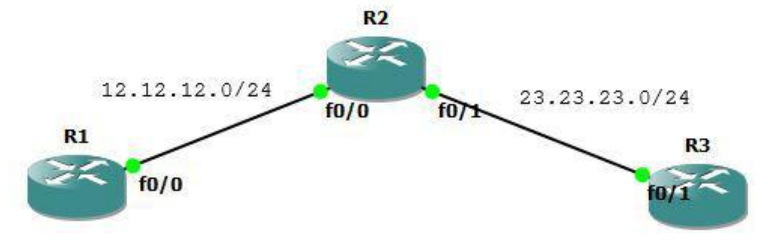
Perform the following configuration.
R1
interface Loopback0
    ip address 1.1.1.1 255.255.255.255
!
interface FastEthernet0/0
    ip address 12.12.12.1 255.255.255.0
!
router eigrp 10
    redistribute static
    network 12.12.12.1 0.0.0.0
    no auto-summary
!

R2
interface Loopback0
    ip address 2.2.2.2 255.255.255.255
!
interface Loopback1
    ip address 22.22.21.1 255.255.255.0
!
interface Loopback2
    ip address 22.22.22.1 255.255.255.0
!
interface Loopback3
    ip address 22.22.23.1 255.255.255.0
!
interface Loopback4
    ip address 22.22.24.1 255.255.255.0
!
interface Loopback5
    ip address 22.22.25.1 255.255.255.0
!
interface FastEthernet0/0
    ip address 12.12.12.2 255.255.255.0
!
interface FastEthernet0/1
    ip address 23.23.23.2 255.255.255.0
    ip summary-address eigrp 10 22.22.0.0 255.255.0.0 5
!
router eigrp 10
    redistribute static
    redistribute rip metric 1 1 1 1 1
    network 2.2.2.2 0.0.0.0
    network 12.12.12.2 0.0.0.0
    network 22.22.0.0 0.0.0.0
    network 23.23.23.2 0.0.0.0
    no auto-summary
!
router rip
    network 22.0.0.0
!
ip route 1.1.1.1 255.255.255.255 FastEthernet0/0

R3
interface Loopback0
    ip address 3.3.3.3 255.255.255.255
!
interface FastEthernet0/1
    ip address 23.23.23.3 255.255.255.0
!
router eigrp 10
    network 3.3.3.3 0.0.0.0
    network 23.23.23.3 0.0.0.0
    no auto-summary
!
Check the routing table on R3.
R3#sh ip route

Gateway of last resort is not set

    1.0.0.0/32 is subnetted, 1 subnets
D EX    1.1.1.1 [170/307200] via 23.23.23.2, 00:00:01, FastEthernet0/1
    2.0.0.0/32 is subnetted, 1 subnets
D       2.2.2.2 [90/409600] via 23.23.23.2, 00:00:01, FastEthernet0/1
    3.0.0.0/32 is subnetted, 1 subnets
C       3.3.3.3 is directly connected, Loopback0
    23.0.0.0/24 is subnetted, 1 subnets
C       23.23.23.0 is directly connected, FastEthernet0/1
    22.0.0.0/16 is subnetted, 1 subnets
D       22.22.0.0 [90/2560025856] via 23.23.23.2, 00:00:04, FastEthernet0/1
    12.0.0.0/24 is subnetted, 1 subnets
D       12.12.12.0 [90/307200] via 23.23.23.2, 00:00:04, FastEthernet0/1
R3#
Now test entering the eigrp stub command.
R2(config-router)#eigrp stubCheck ip route and compare with before. There are only connected and summary routes, while redistributed routes have been removed.
R3#sh ip route

Gateway of last resort is not set

    2.0.0.0/32 is subnetted, 1 subnets
D       2.2.2.2 [90/409600] via 23.23.23.2, 00:00:06, FastEthernet0/1
    3.0.0.0/32 is subnetted, 1 subnets
C       3.3.3.3 is directly connected, Loopback0
    23.0.0.0/24 is subnetted, 1 subnets
C       23.23.23.0 is directly connected, FastEthernet0/1
    22.0.0.0/16 is subnetted, 1 subnets
D       22.22.0.0 [90/2560025856] via 23.23.23.2, 00:00:06, FastEthernet0/1
    12.0.0.0/24 is subnetted, 1 subnets
D       12.12.12.0 [90/307200] via 23.23.23.2, 00:00:09, FastEthernet0/1
R3#
EIGRP Stub – Connected#
A stub router will only advertise directly connected routes.
Continuation of the previous lab. First, remove the previous eigrp stub command.
R2(config)#router eigrp 10
R2(config-router)#no eigrp stub
Check ip route and the routing table has returned to normal. Enter eigrp stub connected.
R3#sh ip route

Gateway of last resort is not set

    1.0.0.0/32 is subnetted, 1 subnets
D EX    1.1.1.1 [170/307200] via 23.23.23.2, 00:00:46, FastEthernet0/1
    2.0.0.0/32 is subnetted, 1 subnets
D       2.2.2.2 [90/409600] via 23.23.23.2, 00:00:46, FastEthernet0/1
    3.0.0.0/32 is subnetted, 1 subnets
C       3.3.3.3 is directly connected, Loopback0
    23.0.0.0/24 is subnetted, 1 subnets
C       23.23.23.0 is directly connected, FastEthernet0/1
    22.0.0.0/16 is subnetted, 1 subnets
D       22.22.0.0 [90/2560025856] via 23.23.23.2, 00:00:46, FastEthernet0/1
    12.0.0.0/24 is subnetted, 1 subnets
D       12.12.12.0 [90/307200] via 23.23.23.2, 00:00:48, FastEthernet0/1

R3#
R2(config-router)# eigrp stub connected
*Mar 1 00:06:02.587: %DUAL-5-NBRCHANGE: IP-EIGRP(0) 10: Neighbor 12.12.12.1
(FastEthernet0/0) is down: peer info changed
*Mar 1 00:06:02.599: %DUAL-5-NBRCHANGE: IP-EIGRP(0) 10: Neighbor 23.23.23.3
(FastEthernet0/1) is down: peer info changed
Check ip route again.
R3#sh ip route

Gateway of last resort is not set

    2.0.0.0/32 is subnetted, 1 subnets
D       2.2.2.2 [90/409600] via 23.23.23.2, 00:00:12, FastEthernet0/1
    3.0.0.0/32 is subnetted, 1 subnets
C       3.3.3.3 is directly connected, Loopback0
    23.0.0.0/24 is subnetted, 1 subnets
C       23.23.23.0 is directly connected, FastEthernet0/1
    12.0.0.0/24 is subnetted, 1 subnets
D       12.12.12.0 [90/307200] via 23.23.23.2, 00:00:12, FastEthernet0/1
R3#
EIGRP Stub – Summary#
A stub router will only advertise summary routes.
R2(config)#router eigrp 10
R2(config-router)#no eigrp stub
R2(config-router)# eigrp stub summary
R3#sh ip route
Gateway of last resort is not set
3.0.0.0/32 is subnetted, 1 subnets
C 3.3.3.3 is directly connected, Loopback0
23.0.0.0/24 is subnetted, 1 subnets
C 23.23.23.0 is directly connected, FastEthernet0/1
22.0.0.0/16 is subnetted, 1 subnets
D 22.22.0.0 [90/2560025856] via 23.23.23.2, 00:00:27, FastEthernet0/1
R3#EIGRP Stub – Static#
A stub router will advertise static routes.
R2(config)#router eigrp 10
R2(config-router)#no eigrp stub
R2(config-router)#eigrp stub static
R3#sh ip route
Gateway of last resort is not set
1.0.0.0/32 is subnetted, 1 subnets
D EX 1.1.1.1 [170/307200] via 23.23.23.2, 00:00:28, FastEthernet0/1
3.0.0.0/32 is subnetted, 1 subnets
C 3.3.3.3 is directly connected, Loopback0
23.0.0.0/24 is subnetted, 1 subnets
C 23.23.23.0 is directly connected, FastEthernet0/1
R3#EIGRP Stub – Redistributed#
A stub router will advertise redistributed routes.
R2(config)#router eigrp 10
R2(config-router)#no eigrp stub
R2(config-router)#eigrp stub redistributed
R3#sh ip route
Gateway of last resort is not set
1.0.0.0/32 is subnetted, 1 subnets
D EX 1.1.1.1 [170/307200] via 23.23.23.2, 00:00:02, FastEthernet0/1
2.0.0.0/32 is subnetted, 1 subnets
D 2.2.2.2 [90/409600] via 23.23.23.2, 00:00:02, FastEthernet0/1
3.0.0.0/32 is subnetted, 1 subnets
C 3.3.3.3 is directly connected, Loopback0
23.0.0.0/24 is subnetted, 1 subnets
C 23.23.23.0 is directly connected, FastEthernet0/1
22.0.0.0/16 is subnetted, 1 subnets
D 22.22.0.0 [90/2560025856] via 23.23.23.2, 00:00:02, FastEthernet0/1
12.0.0.0/24 is subnetted, 1 subnets
D 12.12.12.0 [90/307200] via 23.23.23.2, 00:00:05, FastEthernet0/1
R3#EIGRP Stub – Receive Only#
Continuation of the previous lab. First, remove the previous eigrp stub command.
R2(config)#router eigrp 10
R2(config-router)#no eigrp stub
R2(config-router)#eigrp stub receive-only
Gateway of last resort is not set
3.0.0.0/32 is subnetted, 1 subnets
C 3.3.3.3 is directly connected, Loopback0
23.0.0.0/24 is subnetted, 1 subnets
C 23.23.23.0 is directly connected, FastEthernet0/1
R3#
R1#sh ip route
Gateway of last resort is not set
1.0.0.0/32 is subnetted, 1 subnets
C 1.1.1.1 is directly connected, Loopback0
12.0.0.0/24 is subnetted, 1 subnets
C 12.12.12.0 is directly connected, FastEthernet0/0