

IPv6 Overview
Internet users are growing very rapidly so the available IPv4 space is also getting smaller. Moreover, with the number of devices such as phones and tablets that need internet connection also reduce IPv4 space. The solution is with IPv6 which has much more ip space.
The problem is that IPv4 is different from IPv6, so many protocols are not compatible with each other. Migration from IPv4 to IPv6 has been widely carried out.
Here is a comparison of the number of IPv4 and IPv6.
IPv4 32bit = 2^3 = 4.294.967.296
IPv6 128bit = 2^128 = 340.282.366.920.938.463.463.374.607.431.768.211.456
- With a lot of space provided by IPv6, there is no need to use Network Address Translation (NAT) and Port Address Translation (PAT).
- In terms of header size, IPv6 has a smaller header compared to IPv4.
- IPv6 consists of 16-bit hexadecimal and is case-insensitive, divided into 8 fields, unlike IPv4 which consists of 12-bit and is divided into 4 octets.
- If in IPv4 there is something called an octet, in IPv6 there is something called a field. In IPv6, the prefix is up to 128. For example: 0000:360B:0000:0000:0020:875B:131B/64.
Summarizing IPv6
Original : 2541:0000:360B:0000:0000:0020:875B:131B/64
If there are 0000s, whether contiguous or not, they can be represented by double colons (::). The condition is that all must be 0, there cannot be numbers other than 0.
Summarized : 2541:0000:360B::0020:875B:131B/64
If there is already a :: then if there is 0000 it cannot be represented by :: again because there is only one :: in a single IPv6. 0000 can be represented simply with a 0.
In addition, if there is a field whose front (left side) is 0, then the 0 can be removed.
Summarized again : 2541:0:360B::20:875B:131B/64
In IPv6 there is no broadcast. There are unicast, multicast and anycast.
Unicast, unicast in IPv6 is the same as IPv4. The advantage is that IPv6 can assign more than 1 address to 1 interface. Cool, right?
Multicast, in IPv6, broadcast is replaced by multicast because indeed there is no broadcast in IPv6.
Anycast, in IPv6 several hosts and routers can be given the same ip. For example, we have several web servers with the same anycast ip. That way, we can direct the host accessing the web server to be routed to the nearest web server.
Types of IPv6 IPs
Unique Local, same as private IP in IPv4. Private IP is used for local networks and not for the internet. The network IP used is FD00::/8.
Link Local, used to send and receive IPv6 packets in a single subnet. Every device using IPv6 will automatically have a link local address on its interface and has a link local scope or link local range, meaning packets will not leave the link local. Packets sent to a certain destination will remain in the link local and will not be forwarded to another subnet by the router. Link Local uses network IP FE80::/10.
Link Local is used as RS (Router Solicitation) and RA (Router Advertisement), for network discovery (same as ARP) and is used as next-hop for ip route.
Global Unicast, just like a public ip for the internet. The network IP used is 2000::/3.
Unspecified, this address is used when the host cannot use IPv6, using ::/128
Loopback used for software testing like 127.0.0.1. Loopback uses ip ::1/128.
Site Local. Site local used to be used as a private ip, now it is no longer used. Site local IP is FECO::/10.
IPv6 Basic Link-Local#

By default IPv6 is not active, to activate it type the unicastrouting command.
R1(config)#ipv6 unicast-routingEvery time you configure IPv6 on an interface, the link-local will automatically be created.
R1(config-if)#do sh ipv6 int fa0/0
FastEthernet0/0 is administratively down, line protocol is down
    IPv6 is enabled, link-local address is FE80::C201:9FF:FED0:0 [TEN]
    No Virtual link-local address(es):
    No global unicast address is configured
    Joined group address(es):
        FF02::1
        FF02::2
    MTU is 1500 bytes
    ICMP error messages limited to one every 100 milliseconds
    ICMP redirects are enabled
    ICMP unreachables are sent
    ND DAD is enabled, number of DAD attempts: 1
    ND reachable time is 30000 milliseconds
    ND advertised reachable time is 0 milliseconds
    ND advertised retransmit interval is 0 milliseconds
    ND router advertisements are sent every 200 seconds
    ND router advertisements live for 1800 seconds
    ND advertised default router preference is Medium
    Hosts use stateless autoconfig for addresses.
R1(config-if)#
You can also use the following command.
R2(config)#int fa0/0
R2(config-if)#ipv6 address autoconfig

R2(config)#do show ipv6 int fa0/0
FastEthernet0/0 is administratively down, line protocol is down
    IPv6 is enabled, link-local address is FE80::C202:CFF:FED8:0 [TEN]
    No Virtual link-local address(es):
    No global unicast address is configured
    Joined group address(es):
        FF02::1
        FF02::2
    MTU is 1500 bytes
    ICMP error messages limited to one every 100 milliseconds
    ICMP redirects are enabled
    ICMP unreachables are sent
    ND DAD is enabled, number of DAD attempts: 1
    ND reachable time is 30000 milliseconds
    ND advertised reachable time is 0 milliseconds
    ND advertised retransmit interval is 0 milliseconds
    ND router advertisements are sent every 200 seconds
    ND router advertisements live for 1800 seconds
    ND advertised default router preference is Medium
    Hosts use stateless autoconfig for addresses.
R2(config)#
IPv6 Basic Global Unicast#
R1(config)#int fa0/0
R1(config-if)#ipv6 address 12::1/126
RR1(config-if)#no sh
*Mar 1 00:22:30.687: %LINK-3-UPDOWN: Interface FastEthernet0/0, changed
state to up
*Mar 1 00:22:31.687: %LINEPROTO-5-UPDOWN: Line protocol on Interface
FastEthernet0/0, changed state to up
R2(config)#int fa0/0
R2(config-if)#ipv6 add 12::2/126
R2(config-if)#no sh
*Mar 1 00:21:23.063: %LINK-3-UPDOWN: Interface FastEthernet0/0, changed
state to up
*Mar 1 00:21:24.063: %LINEPROTO-5-UPDOWN: Line protocol on Interface
FastEthernet0/0, changed state to upCheck ping.
R2(config-if)#do ping 12::1
Type escape sequence to abort.
Sending 5, 100-byte ICMP Echos to 12::1, timeout is 2 seconds:
!!!!!
Success rate is 100 percent (5/5), round-trip min/avg/max = 32/54/104 ms
R2(config-if)#
IPv6 Basic EUI-64#
For automatic configuration.
R2(config-if)#int fa0/1
R2(config-if)#ipv6 address 23::/64 eui-64
R2(config-if)#no sh
*Mar 1 00:25:46.951: %LINK-3-UPDOWN: Interface FastEthernet0/1, changed
state to up
*Mar 1 00:25:47.951: %LINEPROTO-5-UPDOWN: Line protocol on Interface
FastEthernet0/1, changed state to up
R3(config)#int fa0/1
R3(config-if)#ipv6 address 23::/64 eui-64
R3(config-if)#no sh
*Mar 1 00:24:13.739: %LINK-3-UPDOWN: Interface FastEthernet0/1, changed
state to up
*Mar 1 00:24:14.739: %LINEPROTO-5-UPDOWN: Line protocol on Interface
FastEthernet0/1, changed state to upCheck R2 and R3 interfaces.
R2(config-if)#do sh ipv6 int br
FastEthernet0/0             [up/up]
    FE80::C202:CFF:FED8:0
    12::2
FastEthernet0/1             [up/up]
    FE80::C202:CFF:FED8:1
    23::C202:CFF:FED8:1
Serial1/0                   [administratively down/down]
Serial1/1                   [administratively down/down]
Serial1/2                   [administratively down/down]
Serial1/3                   [administratively down/down]
R2(config-if)#
R3(config-if)#do sh ipv6 int br
FastEthernet0/0 [administratively down/down]
FastEthernet0/1 [up/up]
FE80::C203:3FF:FEA8:1
23::C203:3FF:FEA8:1
Serial1/0 [administratively down/down]
Serial1/1 [administratively down/down]
Serial1/2 [administratively down/down]
Serial1/3 [administratively down/down]
R3(config-if)#Check ping to R2.
Type escape sequence to abort.
Sending 5, 100-byte ICMP Echos to 23::C202:CFF:FED8:1, timeout is 2 seconds:
!!!!!
Success rate is 100 percent (5/5), round-trip min/avg/max = 28/56/104 ms
R3(config-if)#
IPv6 Routing#
flowchart TD
%% Main Node
IPv6[IPv6 Routing]

    %% Main Category
    IGP[IGP]
    EGP[EGP]

    IPv6 --- IGP
    IPv6 --- EGP

    %% IGP Sub-category
    RIPNG[RIPNG]
    EIGRP[EIGRP]
    OSPF[OSPFv3]

    IGP --- RIPNG
    IGP --- EIGRP
    IGP --- OSPF

    %% EGP Sub-category
    BGP[BGP]

    EGP --- BGP

    %% Teal Color Styling with slightly rounded corners
    classDef tealBox fill:#2ba3b8,stroke:#1d8294,stroke-width:1px,color:#ffffff,rx:5px,ry:5px;
    class IPv6,IGP,EGP,RIPNG,EIGRP,OSPF,BGP tealBox;
IPv6 Static Routing#
Use the previous topology. Check the router interfaces to determine destination and next-hop.
R1#sh ipv6 int br
FastEthernet0/0             [up/up]
    FE80::C201:9FF:FED0:0
    12::1
FastEthernet0/1             [administratively down/down]
Serial1/0                   [administratively down/down]
Serial1/1                   [administratively down/down]
Serial1/2                   [administratively down/down]
Serial1/3                   [administratively down/down]
R1#
R2#sh ipv6 int br
FastEthernet0/0 [up/up]
FE80::C202:CFF:FED8:0
12::2
FastEthernet0/1 [up/up]
FE80::C202:CFF:FED8:1
23::C202:CFF:FED8:1
Serial1/0 [administratively down/down]
Serial1/1 [administratively down/down]
Serial1/2 [administratively down/down]
Serial1/3 [administratively down/down]
R2#R3#sh ipv6 int br
FastEthernet0/0 [administratively down/down]
FastEthernet0/1 [up/up]
FE80::C203:3FF:FEA8:1
23::C203:3FF:FEA8:1
Serial1/0 [administratively down/down]
Serial1/1 [administratively down/down]
Serial1/2 [administratively down/down]
Serial1/3 [administratively down/down]
R3#Static routing configuration on IPv6 is almost the same as IPv4.
R1(config)# ipv6 route 23::/64 12::2
R3(config)#ipv6 route 12::/126 23::C202:CFF:FED8:1
Check the routing table and test ping.
R1#sh ipv6 route
IPv6 Routing Table - 4 entries
Codes:  C - Connected, L - Local, S - Static, R - RIP, B - BGP
        U - Per-user Static route, M - MIPv6
        I1 - ISIS L1, I2 - ISIS L2, IA - ISIS interarea, IS - ISIS summary
        O - OSPF intra, OI - OSPF inter, OE1 - OSPF ext 1, OE2 - OSPF ext 2
        ON1 - OSPF NSSA ext 1, ON2 - OSPF NSSA ext 2
        D - EIGRP, EX - EIGRP external
C   12::/126 [0/0]
     via ::, FastEthernet0/0
L   12::1/128 [0/0]
     via ::, FastEthernet0/0
S   23::/64 [1/0]
     via 12::2
L   FF00::/8 [0/0]
     via ::, Null0
R1#ping 23::C203:3FF:FEA8:1

Type escape sequence to abort.
Sending 5, 100-byte ICMP Echos to 23::C203:3FF:FEA8:1, timeout is 2 seconds:
!!!!!
Succes
R3(config)#do sho ipv6 route
IPv6 Routing Table - 4 entries
Codes: C - Connected, L - Local, S - Static, R - RIP, B - BGP
U - Per-user Static route, M - MIPv6
I1 - ISIS L1, I2 - ISIS L2, IA - ISIS interarea, IS - ISIS summary
O - OSPF intra, OI - OSPF inter, OE1 - OSPF ext 1, OE2 - OSPF ext 2
ON1 - OSPF NSSA ext 1, ON2 - OSPF NSSA ext 2
D - EIGRP, EX - EIGRP external
S 12::/126 [1/0]
via 23::C202:CFF:FED8:1
C 23::/64 [0/0]
via ::, FastEthernet0/1
L 23::C203:3FF:FEA8:1/128 [0/0]
via ::, FastEthernet0/1
L FF00::/8 [0/0]
via ::, Null0
R3(config)#do ping 12::1
Type escape sequence to abort.
Sending 5, 100-byte ICMP Echos to 12::1, timeout is 2 seconds:
!!!!!
Success rate is 100 percent (5/5), round-trip min/avg/max = 64/74/84 ms
R3(config)#Besides using the next-hop ip, static routing configuration can also use a next-hop interface. Especially for IPv6, its link local must be included. First, remove the previous static routing.
R1(config)#no ipv6 route 23::/64 12::2
R3(config)#no ipv6 route 12::/126 23::C202:CFF:FED8:1
R1(config)#ipv6 route 23::/64 FastEthernet 0/0
R1(config)#do ping 23::C203:3FF:FEA8:1

Type escape sequence to abort.
Sending 5, 100-byte ICMP Echos to 23::C203:3FF:FEA8:1, timeout is 2 seconds:
.....
Success rate is 0 percent (0/5)
R1(config)#
Ping failed because the link local has not been included.
R1(config)#no ipv6 route 23::/64 FastEthernet 0/0
R1(config)#ipv6 route 23::/64 FastEthernet 0/0 FE80::C202:CFF:FED8:0
R1(config)#do ping 23::C203:3FF:FEA8:1

Type escape sequence to abort.
Sending 5, 100-byte ICMP Echos to 23::C203:3FF:FEA8:1, timeout is 2 seconds:
!!!!!
Success rate is 100 percent (5/5), round-trip min/avg/max = 72/85/108 ms
R1(config)#
Now configure static routing on R3.
R3(config)#ipv6 route 12::/126 FastEthernet 0/1 FE80::C202:CFF:FED8:1
R3(config)#do ping 12::1

Type escape sequence to abort.
Sending 5, 100-byte ICMP Echos to 12::1, timeout is 2 seconds:
!!!!!
Success rate is 100 percent (5/5), round-trip min/avg/max = 56/68/92 ms
R3(config)#
IPv6 RIPnG#
Still using the previous topology, delete the ipv6 route first. Enter the RIPnG configuration.
R1(config)#ipv6 unicast-routing
R1(config)#int fa0/0
R1(config-if)#ipv6 rip ?
    WORD User selected string identifying this RIP process

R1(config-if)#ipv6 rip 17 ?
    default-information     Configure handling of default route
    enable                  Enable/disable RIP routing
    metric-offset           Adjust default metric increment
    summary-address         Configure address summarization

R1(config-if)#ipv6 rip 17 enable
R2(config)#ipv6 unicast-routing
R2(config)#int fa0/0
R2(config-if)#ipv6 rip 17 enable
R2(config-if)#int fa0/1
R2(config-if)#ipv6 rip 17 enableR3(config)#ipv6 unicast-routing
R3(config)#int fa0/1
R3(config-if)#ipv6 rip 17 enableCheck the routing table and test ping.
R3#sh ipv6 route
IPv6 Routing Table - 4 entries
Codes:  C - Connected, L - Local, S - Static, R - RIP, B - BGP
        U - Per-user Static route, M - MIPv6
        I1 - ISIS L1, I2 - ISIS L2, IA - ISIS interarea, IS - ISIS summary
        O - OSPF intra, OI - OSPF inter, OE1 - OSPF ext 1, OE2 - OSPF ext 2
        ON1 - OSPF NSSA ext 1, ON2 - OSPF NSSA ext 2
        D - EIGRP, EX - EIGRP external
R   12::/126 [120/2]
     via FE80::C202:CFF:FED8:1, FastEthernet0/1
C   23::/64 [0/0]
     via ::, FastEthernet0/1
L   23::C203:3FF:FEA8:1/128 [0/0]
     via ::, FastEthernet0/1
L   FF00::/8 [0/0]
     via ::, Null0
R3#ping 12::1

Type escape sequence to abort.
Sending 5, 100-byte ICMP Echos to 12::1, timeout is 2 seconds:
!!!!!
Success rate is 100 percent (5/5), round-trip min/avg/max = 52/92/160 ms
R3#
Check the working protocol.
R1#sh ipv6 protocols
IPv6 Routing Protocol is "connected"
IPv6 Routing Protocol is "static"
IPv6 Routing Protocol is "rip 17"
    Interfaces:
        FastEthernet0/0
    Redistribution:
        None
R1#sh ipv6 rip 17
RIP process "17", port 521, multicast-group FF02::9, pid 238
     Administrative distance is 120. Maximum paths is 16
     Updates every 30 seconds, expire after 180
     Holddown lasts 0 seconds, garbage collect after 120
     Split horizon is on; poison reverse is off
     Default routes are not generated
     Periodic updates 34, trigger updates 0
 Interfaces:
    FastEthernet0/0
 Redistribution:
    None
R1#
IPv6 EIGRP#
Delete its RIPnG first.
R1(config)#no ipv6 router rip 17
R2(config)#no ipv6 router rip 17
R3(config)#no ipv6 router rip 17
Add loopback interfaces as identity and to make them easier to ping.
R1(config-rtr)#int lo0
R1(config-if)#ipv6 address 1::1/128
R2(config-rtr)#int lo0
R2(config-if)#ipv6 address 2::2/128
R3(config-rtr)#int lo0
R3(config-if)#ipv6 address 3::3/128
Configure EIGRP on the three routers.
R1(config)#ipv6 router eigrp 13
R1(config-rtr)#router-id 1.1.1.1
R1(config-rtr)#no shut
*Mar 1 00:34:24.023: %DUAL-5-NBRCHANGE: IPv6-EIGRP(0) 13: Neighbor
FE80::C201:9FF:FED0:0 (FastEthernet0/0) is up: new adjacency
R2(config-rtr)#int lo0
R2(config-if)#ipv6 eigrp 13
R1(config-rtr)#int fa0/0
R1(config-if)#ipv6 eigrp 13
R2(config)#ipv6 router eigrp 13
R2(config-rtr)#router-id 2.2.2.2
R2(config-rtr)#no shut
*Mar 1 00:33:55.991: %DUAL-5-NBRCHANGE: IPv6-EIGRP(0) 13: Neighbor
FE80::C203:3FF:FEA8:1 (FastEthernet0/1) is up: new adjacency
*Mar 1 00:34:25.179: %DUAL-5-NBRCHANGE: IPv6-EIGRP(0) 13: Neighbor
FE80::C201:9FF:FED0:0 (FastEthernet0/0) is up: new adjacency
R2(config-rtr)#int lo0R2(config-if)#ipv6 eigrp 13
R2(config-rtr)#int fa0/0
R2(config-if)#ipv6 eigrp 13
R2(config-rtr)#int fa0/1
R2(config-if)#ipv6 eigrp 13R3(config)#ipv6 router eigrp 13
R3(config-rtr)#router-id 3.3.3.3
R3(config-rtr)#no shut
*Mar 1 00:33:56.287: %DUAL-5-NBRCHANGE: IPv6-EIGRP(0) 13: Neighbor
FE80::C202:CFF:FED8:1 (FastEthernet0/1) is up: new adjacency
R2(config-rtr)#int lo0
R2(config-if)#ipv6 eigrp 13
R3(config-rtr)#int fa0/1
R3(config-if)#ipv6 eigrp 13Check the routing table and test ping.
R1#sh ipv6 route
IPv6 Routing Table - 7 entries
Codes:  C - Connected, L - Local, S - Static, R - RIP, B - BGP
        U - Per-user Static route, M - MIPv6
        I1 - ISIS L1, I2 - ISIS L2, IA - ISIS interarea, IS - ISIS summary
        O - OSPF intra, OI - OSPF inter, OE1 - OSPF ext 1, OE2 - OSPF ext 2
        ON1 - OSPF NSSA ext 1, ON2 - OSPF NSSA ext 2
        D - EIGRP, EX - EIGRP external
LC  1::1/128 [0/0]
     via ::, Loopback0
D   2::2/128 [90/409600]
     via FE80::C202:CFF:FED8:0, FastEthernet0/0
D   3::3/128 [90/435200]
     via FE80::C202:CFF:FED8:0, FastEthernet0/0
C   12::/126 [0/0]
     via ::, FastEthernet0/0
L   12::1/128 [0/0]
     via ::, FastEthernet0/0
D   23::/64 [90/307200]
     via FE80::C202:CFF:FED8:0, FastEthernet0/0
L   FF00::/8 [0/0]
     via ::, Null0
R1#ping 2::2

Type escape sequence to abort.
Sending 5, 100-byte ICMP Echos to 2::2, timeout is 2 seconds:
!!!!!
Success rate is 100 percent (5/5), round-trip min/avg/max = 16/44/92 ms
R1#ping 3::3

Type escape sequence to abort.
Sending 5, 100-byte ICMP Echos to 3::3, timeout is 2 seconds:
!!!!!
Success rate is 100 percent (5/5), round-trip min/avg/max = 32/57/92 ms
R1#
IPv6 OSPFv3#
Delete the previous EIGRP first.
R1(config)##no ipv6 router eigrp 13
R2(config)##no ipv6 router eigrp 13
R3(config)##no ipv6 router eigrp 13
Now configure its OSPFv3.
R1(config)#ipv6 router ospf 1
*Mar 1 00:21:43.595: %OSPFv3-4-NORTRID: OSPFv3 process 2 could not pick a
router-id,
R1(config-rtr)#router-id 1.1.1.1
R1(config-rtr)#int lo0
R1(config-if)#ipv6 ospf 1 area 0
R1(config-if)#int fa0/0
R1(config-if)#ipv6 ospf 1 area 0
R2(config)#ipv6 router ospf 2
*Mar 1 00:21:43.595: %OSPFv3-4-NORTRID: OSPFv3 process 2 could not pick a
router-id,
please configure manually
R2(config-rtr)#router-id 2.2.2.2
R2(config-rtr)#int lo0
R2(config-if)#ipv6 ospf 2 area 0
R2(config-if)#int fa0/0
R2(config-if)#ipv6 ospf 2 area 0
*Mar 1 00:22:34.395: %OSPFv3-5-ADJCHG: Process 2, Nbr 1.1.1.1 on
FastEthernet0/0 from LOADING to FULL, Loading Done
R2(config-if)#int fa0/1
R2(config-if)#ipv6 ospf 2 area 0R3(config)#ipv6 router ospf 3
*Mar 1 00:25:00.603: %OSPFv3-4-NORTRID: OSPFv3 process 3 could not pick a
router-id,
please configure manually
R3(config-rtr)#router-id 3.3.3.3
R3(config-rtr)#int fa0/1
R3(config-if)#ipv6 ospf 3 area 0
*Mar 1 00:25:23.427: %OSPFv3-5-ADJCHG: Process 3, Nbr 2.2.2.2 on
FastEthernet0/1 from LOADING to FULL, Loading Done
R3(config-if)#int lo0
R3(config-if)#ipv6 ospf 3 area 0Check neighbor.
R2#sh ipv6 ospf neighbor

Neighbor ID     Pri     State       Dead Time   Interface ID    Interface
3.3.3.3         1       FULL/BDR    00:00:35    5
FastEthernet0/1
1.1.1.1         1       FULL/DR     00:00:27    4
FastEthernet0/0
R2#
Check the routing table and test ping.
R1#sh ipv6 route
IPv6 Routing Table - 7 entries
Codes:  C - Connected, L - Local, S - Static, R - RIP, B - BGP
        U - Per-user Static route, M - MIPv6
        I1 - ISIS L1, I2 - ISIS L2, IA - ISIS interarea, IS - ISIS summary
        O - OSPF intra, OI - OSPF inter, OE1 - OSPF ext 1, OE2 - OSPF ext 2
        ON1 - OSPF NSSA ext 1, ON2 - OSPF NSSA ext 2
        D - EIGRP, EX - EIGRP external
LC  1::1/128 [0/0]
     via ::, Loopback0
O   2::2/128 [110/10]
     via FE80::C202:CFF:FED8:0, FastEthernet0/0
O   3::3/128 [110/20]
     via FE80::C202:CFF:FED8:0, FastEthernet0/0
C   12::/126 [0/0]
     via ::, FastEthernet0/0
L   12::1/128 [0/0]
     via ::, FastEthernet0/0
O   23::/64 [110/20]
     via FE80::C202:CFF:FED8:0, FastEthernet0/0
L   FF00::/8 [0/0]
     via ::, Null0
R1#ping 2::2

Type escape sequence to abort.
Sending 5, 100-byte ICMP Echos to 2::2, timeout is 2 seconds:
!!!!!
Success rate is 100 percent (5/5), round-trip min/avg/max = 24/48/80 ms
R1#ping 3::3

Type escape sequence to abort.
Sending 5, 100-byte ICMP Echos to 3::3, timeout is 2 seconds:
!!!!!
Success rate is 100 percent (5/5), round-trip min/avg/max = 36/70/144 ms
R1#
IPv6 Tunneling#
Tunneling is encapsulating one data packet into another data packet. Here, the IPv6 packet is encapsulated into an IPv4 packet.
Static Point-to-Point Tunnel, used for point-to-point tunneling and supports IGP on IPv6. Static Point-to-Point Tunnel is divided into 2, namely:
- Manual Tunnel
- GRE (Generic Routing Encapsulation) Tunnel
Similarities:
Both forward multicast traffic.
Differences:
- For manual tunnels, as the name implies, it requires manual configuration. GRE Tunnels are active by default so there is no need to configure them.
- GRE Tunnel has a larger MTU than manual tunnel.
- The link-local GRE Tunnel is automatically created with EUI-64 and taken from the lowest MAC Address Interface. While the link-local manual tunnel is FE80::/96 + 32 bit tunnel source IPv4.
Dynamic Multipoint IPv6 Tunnel, called dynamic because there is no need to specify the IPv4 end-point manually, or it can be said there is no need to set the tunnel destination, used for point to multipoint tunneling. This Dynamic Multipoint IPv6 Tunnel does not support IGP and only supports static routing or BGP. This Dynamic Multipoint IPv6 Tunnel is divided into 3:
- Automatic 6to4
- ISATAP (Intra-site Automatic Tunneling Addressing Protocol)
Automatic 6to4, using network 2002::/16. Network 2002::/16 is indeed provided specifically for tunneling and not for global unicast.
ISATAP, is almost the same as 6to4, but does not use network 2002::/16 for tunneling but uses global unicast. ISATAP automatically creates a tunnel ID using EUI-64.
IPv6 IPv6IP Tunneling#
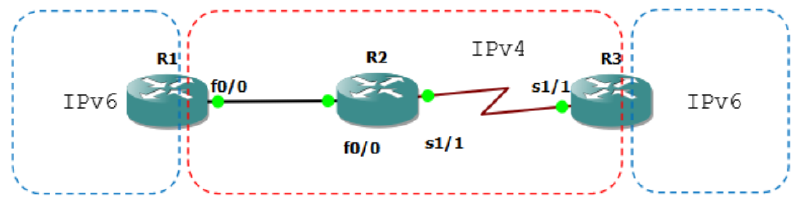
R1(config)#ipv6 unicast-routing
R1(config)#int lo0
R1(config-if)#ipv6 address 1::1/128
R1(config-if)#int fa0/0
R1(config-if)#ip address 12.12.12.1 255.255.255.0
R1(config-if)#no sh
R2(config-if)#int fa0/0
R2(config-if)#ip add 12.12.12.2 255.255.255.0
R2(config-if)#no sh
R2(config-if)#int s1/1
R2(config-if)#ip add 23.23.23.2 255.255.255.0
R2(config-if)#no shR3(config)#ipv6 unicast-routing
R3(config)#int lo0
R3(config-if)#ipv6 add 3::3/128
R3(config-if)#int se1/1
R3(config-if)#ip add 23.23.23.3 255.255.255.0
R3(config-if)#no shNow configure its IPv4 routing, you can use static, EIGRP or OSPF.
R1(config-if)#router ospf 1
R1(config-router)#net 12.12.12.0 0.0.0.255 area 0

R2(config-if)#router ospf 2
R2(config-router)#net 12.12.12.0 0.0.0.255 area 0
R2(config-router)#net 23.23.23.0 0.0.0.255 area 0

R3(config-if)#router ospf 3
R3(config-router)#net 23.23.23.0 0.0.0.255 area 0
Check ping first.
R1#ping 23.23.23.3

Type escape sequence to abort.
Sending 5, 100-byte ICMP Echos to 23.23.23.3, timeout is 2 seconds:
!!!!!
Success rate is 100 percent (5/5), round-trip min/avg/max = 84/99/116 ms
R1#sh ip route

Gateway of last resort is not set

    23.0.0.0/24 is subnetted, 1 subnets
O       23.23.23.0 [110/74] via 12.12.12.2, 00:02:39, FastEthernet0/0
    12.0.0.0/24 is subnetted, 1 subnets
C       12.12.12.0 is directly connected, FastEthernet0/0
R1#
Configure the IPv6IP tunnel.
R1(config)#int tun13
*Mar 1 00:21:38.631: %LINEPROTO-5-UPDOWN: Line protocol on Interface
Tunnel13, changed state to down
R1(config-if)#ipv6 address 13::1/64
R1(config-if)#tunnel source 12.12.12.1
R1(config-if)#tunnel destination 23.23.23.3
*Mar 1 00:22:26.331: %LINEPROTO-5-UPDOWN: Line protocol on Interface
Tunnel13, changed state to up
R1(config-if)#tunnel mode ?
    aurp    AURP TunnelTalk AppleTalk encapsulation
    cayman  Cayman TunnelTalk AppleTalk encapsulation
    dvmrp   DVMRP multicast tunnel
    eon     EON compatible CLNS tunnel
    gre     generic route encapsulation protocol
    ipip    IP over IP encapsulation
    ipsec   IPSec tunnel encapsulation
    iptalk  Apple IPTalk encapsulation
    ipv6    Generic packet tunneling in IPv6
    ipv6ip  IPv6 over IP encapsulation
    mpls    MPLS encapsulations
    nos     IP over IP encapsulation (KA9Q/NOS compatible)
    rbscp   RBSCP in IP tunnel

R1(config-if)#tunnel mode ipv6ip
R3(config)#int tun31
R3(config-if)#ipv6 add 13::3/64
R3(config-if)#tunnel source 23.23.23.3
R3(config-if)#tunnel destination 12.12.12.1
R3(config-if)#tunnel mode ipv6ipR1#sh ipv6 int br
FastEthernet0/0 [up/up]
FastEthernet0/1 [administratively down/down]
Serial1/0 [administratively down/down]
Serial1/1 [administratively down/down]
Serial1/2 [administratively down/down]
Serial1/3 [administratively down/down]
Loopback0 [up/up]
FE80::C201:11FF:FE04:0
1::1
Tunnel13 [up/up]
FE80::C0C:C01
13::1
R1#sh ipv6 int tun13
Tunnel13 is up, line protocol is up
IPv6 is enabled, link-local address is FE80::C0C:C01
No Virtual link-local address(es):
Global unicast address(es):
13::1, subnet is 13::/64
Joined group address(es):
FF02::1
FF02::2
FF02::1:FF00:1
FF02::1:FF0C:C01
MTU is 1480 bytes
ICMP error messages limited to one every 100 milliseconds
ICMP redirects are enabled
ICMP unreachables are sent
ND DAD is enabled, number of DAD attempts: 1
ND reachable time is 30000 milliseconds
Hosts use stateless autoconfig for addresses.
R1#sh int tun13
Tunnel13 is up, line protocol is up
Hardware is Tunnel
MTU 1514 bytes, BW 9 Kbit, DLY 500000 usec,
reliability 255/255, txload 1/255, rxload 1/255
Encapsulation TUNNEL, loopback not set
Keepalive not set
Tunnel source 12.12.12.1, destination 23.23.23.3
Tunnel protocol/transport IPv6/IP
Tunnel TTL 255
Fast tunneling enabled
Tunnel transmit bandwidth 8000 (kbps)
Tunnel receive bandwidth 8000 (kbps)
Last input 00:02:22, output 00:07:11, output hang never
Last clearing of "show interface" counters never
Input queue: 0/75/0/0 (size/max/drops/flushes); Total output drops: 0
Queueing strategy: fifo
Output queue: 0/0 (size/max)
5 minute input rate 0 bits/sec, 0 packets/sec
5 minute output rate 0 bits/sec, 0 packets/sec
9 packets input, 1008 bytes, 0 no buffer
Received 0 broadcasts, 0 runts, 0 giants, 0 throttles
0 input errors, 0 CRC, 0 frame, 0 overrun, 0 ignored, 0 abort
23 packets output, 2152 bytes, 0 underruns
0 output errors, 0 collisions, 0 interface resets
0 output buffer failures, 0 output buffers swapped out
R1#Now test ping.
R1#ping 3::3
Type escape sequence to abort.
Sending 5, 100-byte ICMP Echos to 3::3, timeout is 2 seconds:
!!!!!
Success rate is 100 percent (5/5), round-trip min/avg/max = 92/157/240 ms
R1#sh ipv6 ro
R1#sh ipv6 route
IPv6 Routing Table - 5 entries
Codes:  C - Connected, L - Local, S - Static, R - RIP, B - BGP
        U - Per-user Static route, M - MIPv6
        I1 - ISIS L1, I2 - ISIS L2, IA - ISIS interarea, IS - ISIS summary
        O - OSPF intra, OI - OSPF inter, OE1 - OSPF ext 1, OE2 - OSPF ext 2
        ON1 - OSPF NSSA ext 1, ON2 - OSPF NSSA ext 2
        D - EIGRP, EX - EIGRP external
LC  1::1/128 [0/0]
     via ::, Loopback0
S   3::3/128 [1/0]
     via 13::3
C   13::/64 [0/0]
     via ::, Tunnel13
L   13::1/128 [0/0]
     via ::, Tunnel13
L   FF00::/8 [0/0]
     via ::, Null0
R1#
IPv6 GRE IP Tunneling#
From the previous lab, you just have to change the tunnel mode or simply delete the previous tunnel mode because GRE IP Tunneling is active by default.
Perform the following configuration.
R1(config)#int tunnel 13
R1(config-if)#tunnel mode ipv6i
R1(config-if)#no tunnel mode ipv6ip

R3(config)#int tunnel 31
R3(config-if)#tunnel mode gre ip
Check the interface.
R3#show int tunnel31
Tunnel31 is up, line protocol is up
    Hardware is Tunnel
    MTU 1514 bytes, BW 9 Kbit, DLY 500000 usec,
        reliability 255/255, txload 1/255, rxload 1/255
    Encapsulation TUNNEL, loopback not set
    Keepalive not set
    Tunnel source 23.23.23.3, destination 12.12.12.1
    Tunnel protocol/transport GRE/IP
        Key disabled, sequencing disabled
        Checksumming of packets disabled
    Tunnel TTL 255
    Fast tunneling enabled
    Tunnel transmit bandwidth 8000 (kbps)
    Tunnel receive bandwidth 8000 (kbps)
    Last input 00:03:54, output 00:03:54, output hang never
    Last clearing of "show interface" counters never
    Input queue: 0/75/0/0 (size/max/drops/flushes); Total output drops: 0
    Queueing strategy: fifo
    Output queue: 0/0 (size/max)
    5 minute input rate 0 bits/sec, 0 packets/sec
    5 minute output rate 0 bits/sec, 0 packets/sec
        29 packets input, 3296 bytes, 0 no buffer
        Received 0 broadcasts, 0 runts, 0 giants, 0 throttles
        0 input errors, 0 CRC, 0 frame, 0 overrun, 0 ignored, 0 abort
        38 packets output, 3988 bytes, 0 underruns
        0 output errors, 0 collisions, 0 interface resets
        0 output buffer failures, 0 output buffers swapped out
R3#

Tes ping.
R3#ping 1::1

Type escape sequence to abort.
Sending 5, 100-byte ICMP Echos to 1::1, timeout is 2 seconds:
!!!!!
Success rate is 100 percent (5/5), round-trip min/avg/max = 76/116/152 ms
R3#
IPv6 Tunnel 6to4#
Still using the previous topology. Delete the tunnel interface and its ipv6 route first.
R1(config)#no int tun13
R1(config)#do sh run | s i ipv6 route
ipv6 route 3::3/128 13::3
R1(config)#no ipv6 route 3::3/128 13::3

R3(config)#no int tun31
R3(config)#do sh run | s i ipv6 route
ipv6 route 1::1/128 13::1
R3(config)#no ipv6 route 1::1/128 13::1
Configure 6to4 tunnel.
R1(config)#int tunnel 103
R1(config-if)#ipv6 address 2002:0C0C:0C01::1/64
R1(config-if)#tunnel source 12.12.12.1
R1(config-if)#tunnel mode ipv6ip ?
    6to4            IPv6 automatic tunnelling using 6to4
    auto-tunnel     IPv6 automatic tunnelling using IPv4 compatible addresses
    isatap          IPv6 automatic tunnelling using ISATAP
    <cr>

R1(config-if)#tunnel mode ipv6ip 6to4

R3(config)#int tunnel 301
 Tunnel301, changed state to down
R3(config-if)#tunnel source 23.23.23.3
R3(config-if)#ipv6 address 2002:1717:1703::3/64
R3(config-if)#tunnel mode ipv6ip 6to4
Verification.
R3(config-if)#do ping 2002:0C0C:0C01::1

Type escape sequence to abort.
Sending 5, 100-byte ICMP Echos to 2002:C0C:C01::1, timeout is 2 seconds:
!!!!!
Success rate is 100 percent (5/5), round-trip min/avg/max = 120/147/196 ms
R3(config-if)#

R1(config-if)#do ping 2002:1717:1703::3

Type escape sequence to abort.
Sending 5, 100-byte ICMP Echos to 2002:1717:1703::3, timeout is 2 seconds:
!!!!!
Success rate is 100 percent (5/5), round-trip min/avg/max = 124/139/168 ms
R1(config-if)#

R1#sh int tun 103
Tunnel103 is up, line protocol is up
    Hardware is Tunnel
    MTU 1514 bytes, BW 9 Kbit, DLY 500000 usec,
        reliability 255/255, txload 1/255, rxload 1/255
    Encapsulation TUNNEL, loopback not set
    Keepalive not set
    Tunnel source 12.12.12.1, destination UNKNOWN
    Tunnel protocol/transport IPv6 6to4
    Tunnel TTL 255
    Fast tunneling enabled
    Tunnel transmit bandwidth 8000 (kbps)
    Tunnel receive bandwidth 8000 (kbps)
    Last input never, output 00:01:41, output hang never
    Last clearing of "show interface" counters never
    Input queue: 0/75/0/0 (size/max/drops/flushes); Total output drops: 0
    Queueing strategy: fifo
    Output queue: 0/0 (size/max)
    5 minute input rate 0 bits/sec, 0 packets/sec
    5 minute output rate 0 bits/sec, 0 packets/sec
        0 packets input, 0 bytes, 0 no buffer
        Received 0 broadcasts, 0 runts, 0 giants, 0 throttles
        0 input errors, 0 CRC, 0 frame, 0 overrun, 0 ignored, 0 abort
        6 packets output, 576 bytes, 0 underruns
        0 output errors, 0 collisions, 0 interface resets
        0 output buffer failures, 0 output buffers swapped out
The calculation of its tunnel IP is as follows:
12.12.12.1 -> 01100.01100.01100.0001 -> 0C0C:0C01 -> 2002:0C0C:0C01::1
23.23.23.3 -> 10111.10111.10111.0011 -> 1717:1703 -> 2002:1717:1703::3
The 6to4 tunnel IP uses network 2002::/64. To make it easier, the calculation above can use the calculator on Windows OS with programmer mode.
IPv6 Tunnel ISATAP#
Still using the previous topology. Delete the tunnel interface and its ipv6 route first.
R1(config)#no int tun103
R3(config)#no int tun301
Configure ISATAP tunnel.
R1(config)#int tun 1003
R1(config-if)#ipv6 address 13::/64 eui-64
*Mar 1 00:52:50.127: %LINEPROTO-5-UPDOWN: Line protocol on Interface
Tunnel1003, changed state to down
R1(config-if)#tunnel source 12.12.12.1
R1(config-if)#tunnel mode ipv6ip isatap
R3(config)#int tun 3001
*Mar 1 00:54:17.359: %LINEPROTO-5-UPDOWN: Line protocol on Interface
Tunnel3001, changed state to down
R3(config-if)#tunnel source 23.23.23.3
R3(config-if)#ipv6 add 13::/64 eui-64
R3(config-if)#tunnel mode ipv6ip isatap
Test ping.
R1(config-if)#do sh ipv6 int br
FastEthernet0/0             [up/up]
FastEthernet0/1             [administratively down/down]
Serial1/0                   [administratively down/down]
Serial1/1                   [administratively down/down]
Serial1/2                   [administratively down/down]
Serial1/3                   [administratively down/down]
Loopback0                   [up/up]
    FE80::C201:11FF:FE04:0
    1::1
Tunnel1003                  [up/up]
    FE80::5EFE:C0C:C01
    13::5EFE:C0C:C01
R1(config-if)#

R3(config-if)#do ping

Type escape sequence to abort.
Sending 5, 100-byte ICMP Echos to 13::5EFE:C0C:C01, timeout is 2 seconds:
!!!!!
Success rate is 100 percent (5/5), round-trip min/avg/max = 92/124/152 ms
R3(config-if)#
Enter static routing.
R1(config)#ipv6 route 3::3/128 13::5EFE:1717:1703
R3(config)#ipv6 route 1::1/128 13::5EFE:C0C:C01
Verification.
R1(config)#do ping 3::3

Type escape sequence to abort.
Sending 5, 100-byte ICMP Echos to 3::3, timeout is 2 seconds:
!!!!!
Success rate is 100 percent (5/5), round-trip min/avg/max = 96/117/136 ms
R1(config)#

R3(config)#do ping 1::1

Type escape sequence to abort.
Sending 5, 100-byte ICMP Echos to 1::1, timeout is 2 seconds:
!!!!!
Success rate is 100 percent (5/5), round-trip min/avg/max = 92/132/168 ms
R3(config)#

R1(config)#do sh int tun1003
Tunnel1003 is up, line protocol is up
    Hardware is Tunnel
    MTU 1514 bytes, BW 9 Kbit, DLY 500000 usec,
        reliability 255/255, txload 1/255, rxload 1/255
    Encapsulation TUNNEL, loopback not set
    Keepalive not set
    Tunnel source 12.12.12.1, destination UNKNOWN
    Tunnel protocol/transport IPv6 ISATAP
    Tunnel TTL 255
    Fast tunneling enabled
    Tunnel transmit bandwidth 8000 (kbps)
    Tunnel receive bandwidth 8000 (kbps)
    Last input 00:00:53, output 00:00:53, output hang never
    Last clearing of "show interface" counters never
    Input queue: 0/75/0/0 (size/max/drops/flushes); Total output drops: 0
    Queueing strategy: fifo
    Output queue: 0/0 (size/max)
    5 minute input rate 0 bits/sec, 0 packets/sec
    5 minute output rate 0 bits/sec, 0 packets/sec
        15 packets input, 2100 bytes, 0 no buffer
        Received 0 broadcasts, 0 runts, 0 giants, 0 throttles
        0 input errors, 0 CRC, 0 frame, 0 overrun, 0 ignored, 0 abort
        19 packets output, 2184 bytes, 0 underruns
        0 output errors, 0 collisions, 0 interface resets
        0 output buffer failures, 0 output buffers swapped out
IPv6 Tunnel Auto-Tunnel#
Still using the previous topology. Delete the tunnel interface and its ipv6 route first.
R1(config)#no int tun1003
R3(config)#no int tun3001
Configure autotunnel tunnel.
R1(config)#int tun10003
*Mar 1 00:03:09.163: %LINEPROTO-5-UPDOWN: Line protocol on Interface
Tunnel10003, changed state to down
R1(config-if)#tunnel source 12.12.12.1
R1(config-if)#tunnel mode ipv6ip auto-tunnel

R3(config)#int tun30001
*Mar 1 00:04:15.243: %LINEPROTO-5-UPDOWN: Line protocol on Interface
Tunnel30001, changed state to down
R3(config-if)#tunnel source 23.23.23.3
R3(config-if)#tunnel mode ipv6ip au
R3(config-if)#tunnel mode ipv6ip auto-tunnel
Ping the tunnel.
R3(config-if)#do ping ::12.12.12.1

Type escape sequence to abort.
Sending 5, 100-byte ICMP Echos to ::12.12.12.1, timeout is 2 seconds:
!!!!!
Success rate is 100 percent (5/5), round-trip min/avg/max = 104/136/184 ms
R3(config-if)#do sh int tun30001
Tunnel30001 is up, line protocol is up
    Hardware is Tunnel
    MTU 1514 bytes, BW 9 Kbit, DLY 500000 usec,
        reliability 255/255, txload 1/255, rxload 1/255
    Encapsulation TUNNEL, loopback not set
    Keepalive not set
    Tunnel source 23.23.23.3, destination UNKNOWN
    Tunnel protocol/transport IPv6 auto-tunnel
    Tunnel TTL 255
    Fast tunneling enabled
    Tunnel transmit bandwidth 8000 (kbps)
    Tunnel receive bandwidth 8000 (kbps)
    Last input 00:00:47, output 00:00:47, output hang never
    Last clearing of "show interface" counters never
    Input queue: 0/75/0/0 (size/max/drops/flushes); Total output drops: 0
    Queueing strategy: fifo
    Output queue: 0/0 (size/max)
    5 minute input rate 0 bits/sec, 0 packets/sec
    5 minute output rate 0 bits/sec, 0 packets/sec
        5 packets input, 700 bytes, 0 no buffer
        Received 0 broadcasts, 0 runts, 0 giants, 0 throttles
        0 input errors, 0 CRC, 0 frame, 0 overrun, 0 ignored, 0 abort
        9 packets output, 984 bytes, 0 underruns
        0 output errors, 0 collisions, 0 interface resets
        0 output buffer failures, 0 output buffers swapped out
R3(config-if)#
Configure static routing.
R1(config)#ipv6 route 3::3/128 ::23.23.23.3
R3(config)#ipv6 route 1::1/128 ::12.12.12.1
Verification.
R1(config)#do ping 3::3

Type escape sequence to abort.
Sending 5, 100-byte ICMP Echos to 3::3, timeout is 2 seconds:
!!!!!
Success rate is 100 percent (5/5), round-trip min/avg/max = 120/136/168 ms
R1(config)#

R3(config)#do ping 1::1
Type escape sequence to abort.
Sending 5, 100-byte ICMP Echos to 1::1, timeout is 2 seconds:
!!!!!
Success rate is 100 percent (5/5), round-trip min/avg/max = 84/131/156 ms
R3(config)#