

A repetition (looping) instruction is an instruction that can repeat the execution of a series of other instructions repeatedly according to specified conditions. The structure of a looping instruction basically consists of:
- Loop condition. A condition that must be met for the loop to occur.
- Loop body. A series of instructions whose execution will be repeated.
- Loop counter. A variable whose value must change for the loop to occur and ultimately limit the number of loops that can be executed.
Loop Forms in Python#
ForLoop. A loop that executes the “same statement block” repeatedly based on specified requirements or conditions.WhileLoop. A loop that executes commands as long as the condition evaluates to true.- Nested Loop. A loop inside a loop.
1. For Loop#
General Form
For variable in range:
  statements
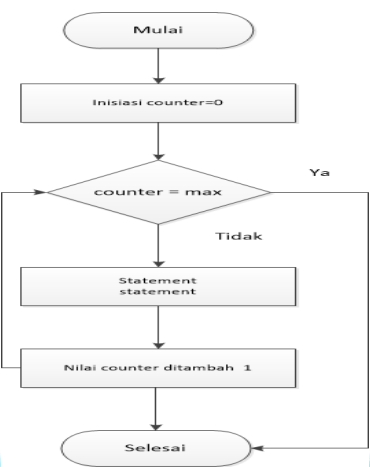
Flowchart - For
Displaying a Series of Numbers#
Algorithm series
Declaration
  n, i : integer
Begin
  read(n)
  for i in range n
    write(i)
End
# Display Number Series
n = int(input('Amount of Data: '))
for i in range(n):
print(i)
# Output
Amount of Data : 5
0 1 2 3 4Algorithm explanation: First input the value n, for example: 5, then a loop occurs with i=0 up to n. The loop is executed as long as the condition is true. Then write (i) produces output 0 etc., the process
is repeated again until i is less than the value of n.
| Command | n | i=0..n | i | Output |
|---|---|---|---|---|
| read(n) | 5 | |||
| i=0: write(i) | true | 0 | 0 | |
| i=1: write(i) | true | 1 | 1 | |
| i=2: write(i) | true | 2 | 2 | |
| i=3: write(i) | true | 3 | 3 | |
| i=4: write(i) | true | 4 | 4 | |
| i=5: write(i) | false |
2. While Loop#
The loop will continue to be executed as long as the condition is True/correct.
General Form
while condition:
  statement(s)
While Loop Flowchart
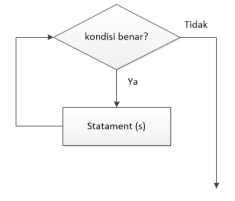
- There is an instruction related to the condition before entering the
whileso that this condition is true (met) and the repetition can be executed. - There is an instruction among the repeated instructions that changes the value of the loop variable so that when the loop condition is not met, the loop stops.
Displaying a Series of Even Numbers#
Algorithm series
Declaration
  n, x : integer
Begin
    read(n)
    x <- 2
    while x <= n do
        write(x)
        x <- x + 2
End
# Display a Series of Even Numbers
n = int(input('Enter the Value of N: '))
x = 2
while x <= n:
print(x, end=" ")
x = x + 2
# Output
Enter the Value of N : 8
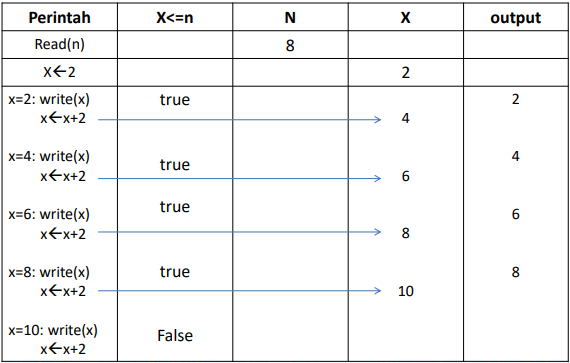
2 4 6 8First input the value n = 8, then x is given the value 2, after that x is compared with n. If (x<=n) is true then x is displayed then x is added by 2 and produces a new x value. After that the data goes back up and tests if (X<=N) is true, if yes the same process as before is done again. And so on until (x<=n) is false.
Series Storage Table#
While algorithm to display numbers 1 to 15#
Algorithm While_Loop
{printing numbers 1 to 15}
Declaration
number = 1

Description
  while number <= 15:
    print number
number <- number + 1
Python Program to Print numbers 1 to 15#
# While Loop
angka = 1
while angka <= 15:
  print ("Number: ", angka)
  angka = angka + 1
print ("Thank You")

# Output
Running Result :
Number: 1
Number: 2
Number: 3
Number: 4
Number: 5
Number: 6
Number: 7
Number: 8
Number: 9
Number: 10
Number: 11
Number: 12
Number: 13
Number: 14
Number: 15
Thank You
Python Program to Print numbers Descending from 10 to 1#
# While Loop
# Printing numbers 10 to 1
bil = 10
while bil > 0:
    print(bil)
    bil = bil - 1
print("Result of Printing Numbers in Descending Order")

# Output
10
9
8
7
6
5
4
3
2
1
Result of Printing Numbers in Descending Order
Python Program to Determine if a Number is Prime or Not#
# Input number
bilangan = int(input("Enter Number: "))

# Prime numbers must be greater than 1
if bilangan > 1:
    for i in range(2, bilangan):
        if (bilangan % i) == 0:
            print(bilangan, "is not a prime number")
            print(i, "times", bilangan // i, "=", bilangan)
            break
    else:
        print(bilangan, "is a prime number")
# If the number is less than or equal to one
else:
    print(bilangan, "is not a prime number")

# Output
Enter Number : 137
137 is a prime number

Enter Number : 147
147 is not a prime number
3 times 49 = 147
BREAK Command;#
Functions to exit a for or while loop, its general form is:
...

...
break
...

...
Python Program Using the Break Command#
# break command in a for loop
# The program will exit after printing numbers up to 6 because of the break command
bil = 6
for i in range(0, 10):
    print(i)
    if i == bil:
        break

# Output
0
1
2
3
4
5
6break; instructionContinue Command:#
The Continue function will perform the repetition starting from the beginning again.
# Use of continue in while
bil = 0
pilihan = 'y'

while (pilihan != 'n'):
    bil = int(input("Enter a number below 50: "))
    if (bil > 50):
        print("Number exceeds 50, Please try again.")
        continue
    print("The square of this number is: ", bil * bil)
    pilihan = input("Do you want to try again (y/n)? ")

# Output
Enter a number below 50: 20
The square of this number is: 400
Do you want to try again (y/n)? y
Enter a number below 50: 36
The square of this number is: 1296
Do you want to try again (y/n)? y
Enter a number below 50: 70
Number exceeds 50, Please try again.
Enter a number below 50: 25
The square of this number is: 625
Do you want to try again (y/n)? n
3. Nested Loop#
General Form of Nested While:
While condition:
  while condition:
    statement(s)
  statement(s)
General Form of Nested For:
for variable in range:
  for variable in range:
    statement(s)
  statement(s)
Python Program Using Nested While to Print Prime Numbers between 1 - 50#
# Program Using Nested While
# To print prime numbers between 1 and 50

i = 2
while(i < 50):
    j = 2
    while(j <= (i/j)):
        if not(i % j):
            break
        j = j + 1
    if (j > i/j):
        print(i, "is a Prime Number")
    i = i + 1

print("Thank You")

# Output
2 is a Prime Number
3 is a Prime Number
5 is a Prime Number
7 is a Prime Number
11 is a Prime Number
13 is a Prime Number
17 is a Prime Number
19 is a Prime Number
23 is a Prime Number
29 is a Prime Number
31 is a Prime Number
37 is a Prime Number
41 is a Prime Number
43 is a Prime Number
47 is a Prime Number
Thank You
Python Program#
- Create a Program to print even numbers from 1 to 10:
for i in range(2,12,2):
    print(i)

# Output
2
4
6
8
10- Create a program to sum Numbers 1 to 10
jum = 0
for i in range(10):
    i = i + 1
    print(i)
    jum = jum + i

print("The Sum of Numbers 1 - 10 is: ", jum)

#Output
1
2
3
4
5
6
7
8
9
10
The Sum of Numbers 1 - 10 is: 55- Create a program to draw a right-angled triangle by inputting an integer.
Input & output format:
Input is an integer with the range: 1 ≤ 𝑁 ≤ 100.
The program output is the ‘*’ character depicting a right-angled triangle pattern.
# Ask the user for a positive integer input
n = int(input("Enter a Positive Integer: "))

# Input validation, ensure n is a positive integer
if n <= 0:
    print("Invalid input. Please enter a positive integer.")
else:
    # Perform a nested for loop to generate the right-angled pattern
    for i in range(0, n):
        for j in range(0, i + 1):
            print('* ', end='')
        print('')  # Move to the next line after each line of stars is complete

# Output
*
* *
* * *
* * * *
* * * * *