
Able to understand PHP language architecture, Variable Declaration, Constants, Data Types and comments in PHP
Understanding PHP Hypertext Preprocessor (PHP)#
PHP or PHP Hypertext Preprocessor is a server-side based scripting language capable of parsing php code from web code with a .php extension, resulting in a dynamic website display on the client side (browser). With PHP, you can make HTML pages more powerful and can be used as complete applications, for example for various cloud computing applications.
PHP is a scripting language that is very well suited for web development and can be embedded into HTML. PHP was originally developed by a programmer named Rasmus Lerdorf in 1995, but since then it has always been developed by an independent group called the PHP Group and this Group also defines the de facto standard for PHP because there is no formal specification. Currently its development is led by the deadly duo, Andi Gutmans and Zeev Suraski.
What causes PHP to be widely used by many people is because PHP is free software (Open Source) released under the PHP license. This means that using this programming language is free, liberated, and open.
Inserting PHP Code#
Unlike regular HTML pages, PHP code will not be given by the server directly when there is a request from the client (browser), but through processing from the server side, which is why PHP is called a server-side script.
PHP code is inserted into HTML code by slipping it inside the HTML code. To distinguish PHP code from HTML code, a opening tag is given in front of the PHP code and a closing tag is given at the end of the PHP code.
With PHP code, a web page can do many dynamic things, such as accessing a database, creating images, reading and writing files, and so on. The final result of PHP code processing will be returned again in the form of HTML code to be displayed in the browser. There are 4 types of tags that can be used to insert PHP code.
Types of PHP Tags
| Tag Type | Opening Tag | Closing Tag |
|---|---|---|
| Standard Tag | <?php | ?> |
| Short Tag | <? | ?> |
| ASP Tag | <% | %> |
| Script Tag | <script language="php"> | </script> |
What can be directly applied on all platforms are standard tags and script tags. In this module the programming language used is PHP Version 5 so the type of tag that must be used is the standard tag. For other tags need setting on the server by the server administrator.
PHP Script Example#
Open a new file in Notepad. Then type the script as below:
<?php
echo "Ini adalah Script PHP Pertama Saya <br>";
echo "Saya sedang belajar PHP";
?>
Save the file with the name contoh04.php
To see the results, open the browser and go into localhost and the storage folder. Select the contoh04.php file and the result will appear:
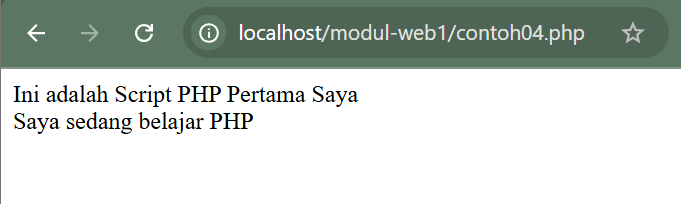
Contoh04.php is an example of a standalone php script without any additional scripts. The echo command is a command used to print. PHP scripts can also be combined within HTML tags.
Differences between HTML and PHP#
- HTML can be accessed directly without going through server access when there is a request from the client (browser)
- PHP must be accessed through the server when there is a request from the client (browser)
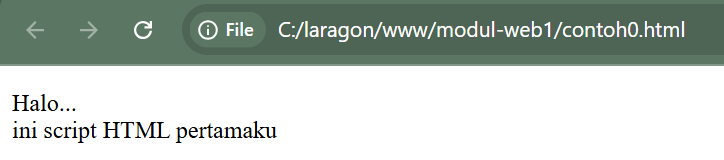
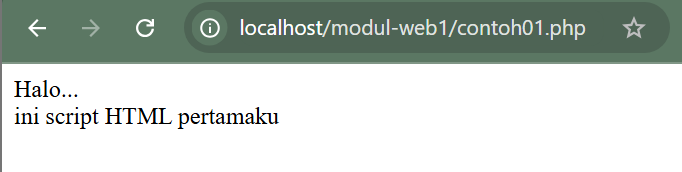
From the 2 pictures above can you see the difference, without looking at the file name extension?
Yes, for files with the html extension, we can see the results directly in the browser, without having to run server access. However, for files with the php extension, we have to run them through server access, namely localhost, and the file storage must also be saved in htdocs located in the xampp folder.
Variables#
A variable is a term that states a place that accommodates certain values where the value in it can be changed. Variables are important because without variables it is impossible to store certain values to be processed.
Variables are characterized by the presence of a dollar sign ($) which can then be followed by numbers, letters, and underscores. However, variables cannot contain spaces. The following is an example of defining a variable. To define a variable, you only need to write it down, then the variable is automatically recognized by PHP.
$nama$no_telp$_pekerjaan
A variable is a place to store data in a certain type, a variable can be null (has no content yet), a number, string, object, array, Boolean, and its contents can be changed later.
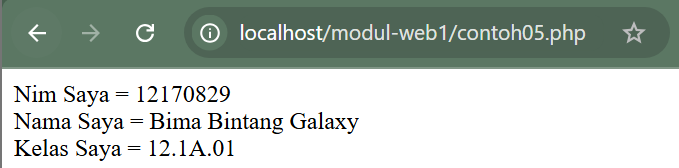
Contoh05.php
<html>

<head>
    <title> Contoh Script PHP</title>
</head>
<?php

$nim = "12170829";
$nama = "Bima Bintang Galaxy";
$kelas = "12.1A.01";

echo "Nim Saya = $nim<br>";
echo "Nama Saya = $nama<br>";
echo "Kelas Saya = $kelas<br>";

?>
</body>

</html>
Result:
Data Types#
Unlike other programming languages, variables in PHP are more flexible. We don’t need to define the type when defining it for the first time. There are 6 basic Data types that can be accommodated in PHP, as seen in the table.
Types of Data Types#
| Type | Example | Explanation |
|---|---|---|
| Integer | 134 | All non-fractional numbers |
| Double | 5.1234 | Fractional values |
| String | “asep” | A collection of characters |
| Boolean | False | One of the values True or False |
| Object | An instance of a class | |
| Array | An array |
To find out the data type of a variable, we can use the gettype command, for example:print gettype ($nama_variabel);
You can also change certain variable types with the command:(variable_type) $variable_name;
For example, to convert a variable into a string, we can use the command:$var_string = (string) $angka;
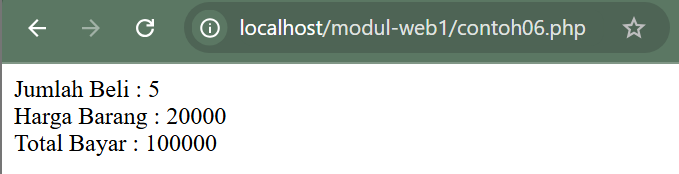
Contoh06.php
<html>
<head>
        <title>Contoh 06</title>
</head>
<body>
<?php
        $jumlah=5;
        $harga=20000;
        $total=$harga*$jumlah;

echo "Jumlah Beli : $jumlah<br>";
echo "Harga Barang : $harga<br>";
echo "Total Bayar : $total<br>";
?>
</body>
</html>
Result:
Constants#
In addition to variables, a program generally also allows for constants. Constants function the same as variables but their values are static/constant and cannot change. The way to define a constant is:Define ("CONSTANT_NAME", constant_value);
Once defined, we can use it immediately by typing the name of the constant. Constant names are generally typed using uppercase letters.
Comments#
Programming is the activity of writing a language understood by machines. Although the language used is a high-level language, of course it is still not as easy to understand as plain language. For this reason we can use comments. The following is an example of making comments in php.
//komentar satu baris
#ini juga komentar satu baris
/*komentar
Banyak baris
Kode di sini tidak
Dieksekus oleh parser */
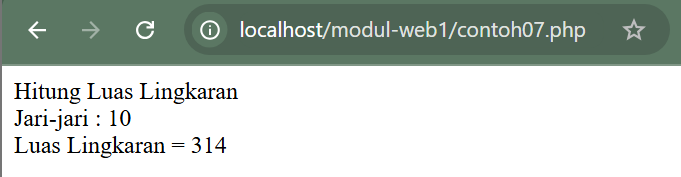
Example script for constants & comments.
Contoh07.php
<html>
<head>
    <title> Menghitung Luas Lingkaran</title>
</head>
<body>
<?php
//konstanta untuk nilai judul
define("Judul","Hitung Luas Lingkaran");

//konstanta untuk nilai phi
define("PHI",3.14);

echo Judul;
$r = 10;
echo "<br> Jari-jari : $r <br>";
$luas = PHI*$r*$r;
echo "Luas Lingkaran = $luas";
?>
</body>
</html>
Result: